
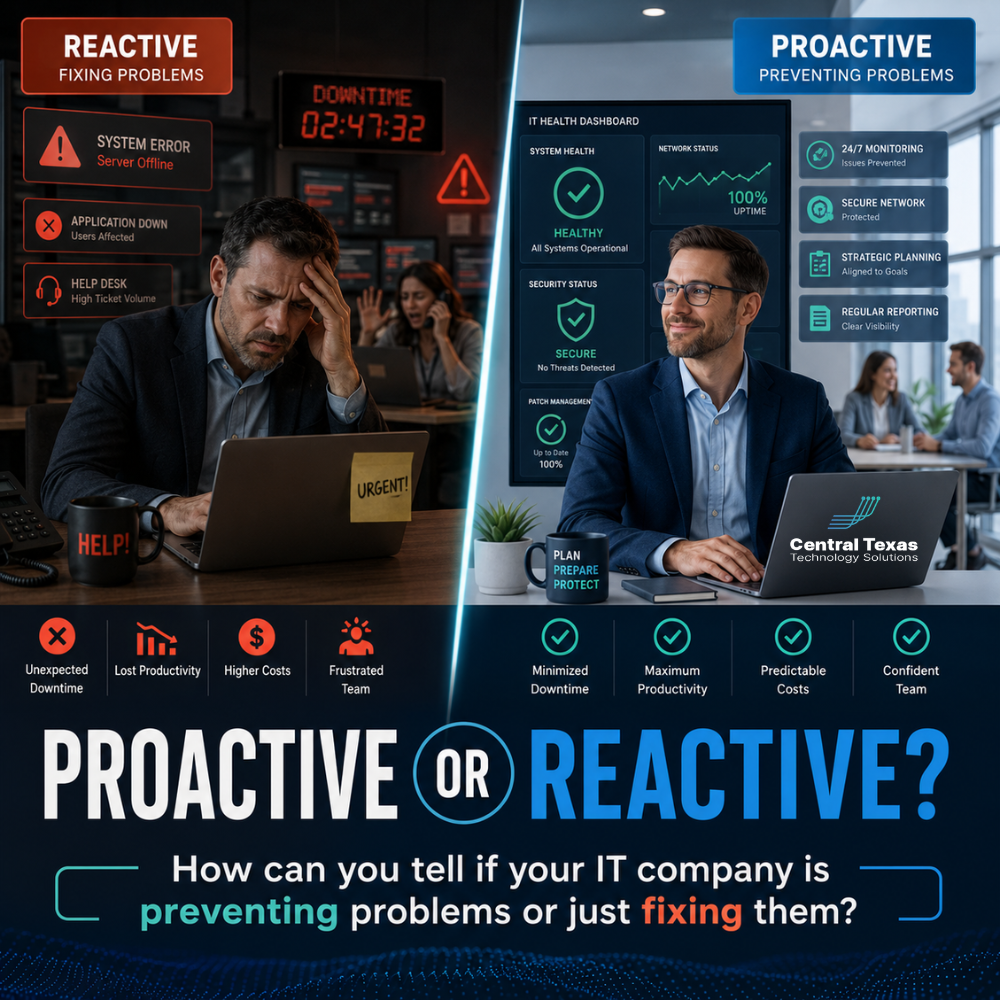
When your business has an IT problem, you need help fast. A down server, slow network, email issue, or cybersecurity alert can disrupt your team, frustrate customers, and slow down revenue.
But here is the bigger question:
Is your IT company only showing up after something breaks?
Many businesses in Austin, Georgetown, Temple, and Belton do not realize they are working with a reactive IT provider until the same problems keep happening again and again. The tickets get closed, but the root cause never seems to go away.
A proactive IT company does more than respond to problems. It helps prevent them. It watches for warning signs, plans ahead, improves security, and aligns your technology with your business goals.
For business leaders in healthcare, legal, professional services, construction, manufacturing, and nonprofits, that difference matters. Reactive IT creates risk. Proactive IT creates confidence.
Why Proactive IT Support Matters for Austin Businesses
Every business depends on technology, but not every business manages technology the same way.
A construction company may need reliable access to project files from the field. A healthcare practice may need secure systems that protect patient information. A law firm may need dependable document access and email security. A manufacturer may need uptime across office and production systems. A nonprofit may need to stretch its budget while keeping donor data protected. A professional services firm may need fast, secure collaboration across hybrid teams.
In each case, waiting for something to break is expensive.
Reactive IT may feel acceptable when things are quiet, but it often leads to:
- Recurring downtime
- Slow response during urgent issues
- Weak cybersecurity controls
- Outdated hardware and software
- Poor documentation
- Unclear technology planning
- Surprise costs
- Frustrated employees
Proactive IT support reduces those risks by looking ahead. It helps your business avoid preventable problems, strengthen security, and make smarter technology decisions before urgency takes over.
What Reactive IT Support Looks Like
Reactive IT support is usually easy to spot once you know what to look for.
The provider waits for your team to report an issue. They fix the immediate problem, close the ticket, and move on. There may be little follow-up, little planning, and little discussion about why the issue happened in the first place.
Common signs of reactive IT support include:
- Your team reports the same issues repeatedly
- Problems are fixed temporarily instead of solved permanently
- Security updates are handled inconsistently
- Backups are assumed to work but rarely tested
- Hardware replacement only happens after failure
- You rarely receive strategic recommendations
- Your provider does not review your business goals
- IT costs feel unpredictable
- You only hear from your IT company when something is wrong
Reactive IT companies are often busy putting out fires. That does not mean they are careless or unqualified. It simply means their service model may not be designed to prevent problems before they affect your business.
For growing companies, that creates a serious gap.
What Proactive IT Support Looks Like
A proactive IT company takes responsibility for more than repairs. It works to understand your business, identify risks, and keep your technology moving in the right direction.
Instead of asking, “What broke today?” a proactive provider asks:
“What can we do now to prevent problems later?”
That shift changes everything.
A proactive IT company should help with:
- Monitoring systems for early warning signs
- Applying security updates consistently
- Reviewing backup health and recovery readiness
- Planning hardware and software upgrades
- Documenting your technology environment
- Improving cybersecurity policies
- Supporting compliance needs
- Reducing recurring support tickets
- Helping leadership budget for IT improvements
- Aligning technology with business goals
For businesses in Austin and Central Texas, this kind of support can mean fewer interruptions, stronger security, better productivity, and more predictable growth.
Proactive IT Companies Monitor Before Problems Become Emergencies
One of the clearest signs of proactive IT support is monitoring.
A reactive provider waits for your employees to notice something is wrong. A proactive provider uses monitoring tools to watch servers, workstations, networks, backups, and security systems before users are affected.
For example, an IT company may detect that a server is running out of storage, a backup failed overnight, a firewall needs attention, or a workstation is showing signs of hardware failure.
That gives your provider time to act before the problem becomes a business disruption.
This is especially important for businesses that cannot afford downtime, including healthcare offices, legal teams, manufacturing companies, construction firms, nonprofits, and professional services organizations.
Your team should not have to be the monitoring system.
Proactive IT Support Reduces Recurring Problems
Every company has occasional IT issues. The real concern is when the same issues keep returning.
If your employees constantly deal with slow computers, dropped connections, printer problems, email issues, password lockouts, or unreliable access to shared files, your IT provider should be looking for patterns.
A reactive provider may fix each ticket individually.
A proactive provider asks:
- Why does this keep happening?
- Is there an aging device causing repeated trouble?
- Is the network overloaded?
- Are permissions configured incorrectly?
- Is employee training needed?
- Is software outdated?
- Is there a larger security or infrastructure issue?
Recurring problems waste time. They also create frustration that affects morale, customer service, and productivity.
CTTS helps businesses move beyond temporary fixes by identifying the root cause and building a plan to prevent repeat issues.
Proactive IT Companies Talk About Cybersecurity Before an Attack
Cybersecurity is one of the biggest differences between proactive and reactive IT.
A reactive company may help after a phishing attack, ransomware incident, account compromise, or data loss event.
A proactive company works to reduce the chances of those events happening in the first place.
That includes practical safeguards such as:
- Multi-factor authentication
- Email security
- Endpoint protection
- Firewall management
- Security awareness training
- Access control reviews
- Patch management
- Backup and recovery planning
- Cyber insurance questionnaire preparation
- Incident response planning
Business leaders often assume cybersecurity is only a concern for large companies. That is a dangerous misconception. Small and mid-sized businesses are frequently targeted because attackers know their defenses may be weaker.
For healthcare providers, law firms, professional services companies, construction businesses, manufacturers, and nonprofits, a proactive cybersecurity strategy protects more than data. It protects trust, operations, and reputation.
Proactive IT Support Includes Backup Testing and Recovery Planning
Many businesses have backups. Fewer businesses know whether those backups will actually work when needed.
That is a major warning sign.
A reactive IT provider may install a backup solution and assume it is doing its job. A proactive IT company verifies backup health, checks for failures, and helps your business understand how recovery would work during a real incident.
Strong backup planning should answer questions such as:
- What systems are being backed up?
- How often are backups running?
- How long would recovery take?
- Has restoration been tested?
- Who is responsible during an outage?
- What happens if a server, device, or cloud account is compromised?
Backup tools are only useful if they support real business continuity.
For businesses across Austin, Round Rock, Georgetown, and Cedar Park, recovery planning can be the difference between a short interruption and a major operational crisis.
Proactive IT Companies Help You Plan Your Budget
Reactive IT often leads to surprise expenses.
A device fails. A server reaches end of life. Software licensing changes. A security tool is suddenly required. A compliance need appears right before an audit.
When IT planning is ignored, leadership is forced to make fast decisions under pressure.
A proactive IT company helps you see what is coming.
That may include:
- Lifecycle planning for computers, servers, and network equipment
- Software licensing reviews
- Cybersecurity improvement roadmaps
- Cloud strategy discussions
- Budget forecasting
- Compliance preparation
- Strategic planning meetings
This does not mean every recommendation must be acted on immediately. It means your business should have visibility, options, and time to make smart decisions.
CTTS works as a strategic IT partner, helping business leaders understand what needs attention now, what can wait, and what should be planned for the future.
Proactive IT Support Aligns Technology With Business Goals
Technology should support where your business is going.
If your company is hiring, opening another location, moving to hybrid work, improving security, preparing for an audit, or upgrading critical systems, your IT provider should be part of that conversation early.
A proactive IT company wants to understand your goals, not just your tickets.
That matters because business changes often create technology needs, such as:
- New user onboarding
- Secure remote access
- Better collaboration tools
- Cloud storage planning
- Network upgrades
- Compliance documentation
- Cybersecurity policies
- Device standardization
- Vendor coordination
When IT is included too late, projects become harder, more expensive, and more disruptive.
When IT is included early, your provider can help you make decisions that support growth, security, productivity, and business continuity.
Questions to Ask Your IT Company
If you are not sure whether your IT company is proactive or reactive, ask direct questions.
Here are some helpful ones:
- How do you monitor our systems?
- How do you identify recurring issues?
- How often do you review our backup status?
- When was the last time you tested recovery?
- How do you handle patch management?
- Do you provide cybersecurity recommendations?
- Do you help us plan hardware replacement?
- Do you meet with us to discuss business goals?
- Do you document our IT environment?
- What risks should we be planning for over the next 12 months?
The answers will tell you a lot.
A proactive provider should be able to explain their process clearly. They should not make you feel confused, dismissed, or left in the dark.
Warning Signs Your IT Company May Be Too Reactive
Not every IT problem means you have the wrong provider. But consistent patterns should get your attention.
Your IT company may be too reactive if:
- You only hear from them after something breaks
- You receive little guidance unless you ask for it
- Your employees keep reporting the same problems
- You do not have a clear IT roadmap
- Security improvements are rarely discussed
- Backup testing is not documented
- Hardware replacement feels rushed or last minute
- Your provider cannot explain your biggest technology risks
- You feel like IT is always urgent, never planned
If this sounds familiar, your business may not need more tickets closed. You may need a better strategy.
The Right IT Partner Helps You Move Forward With Confidence
Your business does not need an IT company that only reacts to problems. You need a partner who helps you stay ahead of them.
That is where CTTS comes in.
CTTS helps businesses in Austin, Round Rock, Georgetown, Cedar Park, and across Central Texas prevent problems, strengthen cybersecurity, reduce downtime, and make better technology decisions. Instead of waiting for your systems to fail, CTTS works proactively to keep your business moving.
Whether you lead a healthcare practice, law firm, professional services company, construction business, manufacturing operation, or nonprofit, your technology should support your goals, not create constant stress.
If you are wondering whether your current IT company is helping you plan ahead or simply responding after problems happen, it may be time for a fresh look.
Schedule a consultation with CTTS today and find out how proactive IT support can help your business move forward with confidence.
Frequently Asked Questions About Proactive IT Support
How do I know if my IT company is proactive?
A proactive IT company monitors your systems, reviews security risks, tests backups, plans upgrades, documents your environment, and regularly discusses your business goals. If your provider only responds after something breaks, they may be operating reactively.
Is proactive IT support more expensive than reactive IT support?
Proactive IT support may look like a larger investment upfront, but it often helps reduce surprise costs, downtime, recurring issues, and security risks. The real cost of reactive IT is usually found in lost productivity, emergency repairs, and preventable disruptions.
What should a proactive IT provider review regularly?
A proactive IT provider should regularly review system health, cybersecurity controls, backup status, hardware lifecycle, software licensing, user access, network performance, and business goals. These reviews help your company stay prepared instead of constantly reacting to emergencies.
Contact CTTS today for IT support and managed services in Austin, TX. Let us handle your IT so you can focus on growing your business. Visit CTTSonline.com or call us at (512) 388-5559 to get started!
Not sure what to look for in IT services? Start here:
How to Choose the Right IT Consulting Firm in Austin
Questions to Ask Before Hiring an IT Support Company
What Makes a Managed Services Provider a True Business Partner?
Red Flags to Watch for When Evaluating IT Consulting Companies
What Professional IT Services Should Look Like in 2026
How Do You Evaluate an IT Provider’s Response Time Before Signing a Contract?
What Does a Strong IT Onboarding Process Look Like for Your Business?