
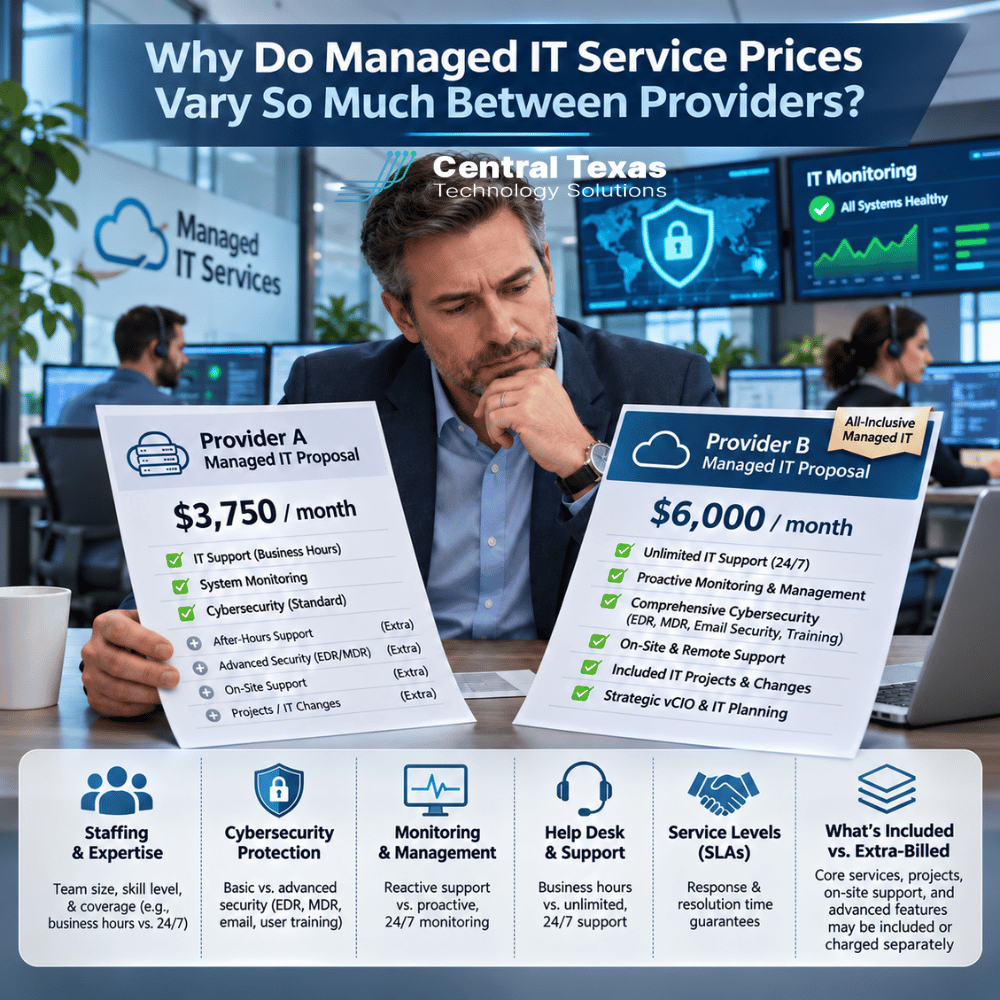
You've requested quotes from two managed IT service providers. Both promise unlimited support, cybersecurity protection, network monitoring, and ongoing maintenance. Yet one charges $125 per user per month while the other wants $250.
That's a significant difference, especially for a business with 30 or 50 employees.
So why is one IT company charging twice as much as another? Are you paying extra for better service, or is the more expensive provider simply overpriced?
The answer usually comes down to what you're actually getting for your money.
Managed IT service prices can vary dramatically because providers differ in staffing, security tools, monitoring practices, response times, and what's included in their monthly agreements. Understanding those differences helps you compare proposals fairly and avoid expensive surprises.
1. Managed IT Service Pricing Starts With the People Supporting Your Business
One of the biggest factors affecting managed IT service prices is staffing.
Two providers might advertise the same services but operate with very different support teams.
A lower-priced provider might rely on a small group of general technicians handling everything from password resets to complicated network failures. A higher-priced provider might employ dedicated help desk technicians, senior engineers, cybersecurity specialists, and experienced IT managers.
Neither staffing model automatically guarantees better service. However, the experience, availability, and organization of the team can make a substantial difference when something goes wrong.
Consider what happens when your company's server becomes unavailable during business hours.
With one provider, the technician answering your call might need to research the problem, escalate it to another employee, or schedule someone to investigate later.
Another provider might have experienced engineers available to begin troubleshooting immediately.
The difference isn't simply how quickly someone answers the phone. It's how efficiently the provider identifies and resolves problems.
When comparing providers, ask:
- How many technicians support your customers?
- Are senior engineers available when problems become complicated?
-
Does your monthly agreement include onsite support?
- Who handles cybersecurity incidents?
- Will your company have a dedicated account manager or strategic IT advisor?
The answers reveal much more about the value of a proposal than the monthly price alone.
2. Cybersecurity Tools Can Create Major Differences in IT Service Costs
Cybersecurity is another major reason managed IT pricing varies.
Nearly every managed IT provider advertises some form of security protection. However, the actual technology and services included can be very different.
One provider might include basic antivirus software and firewall management. Another might provide advanced endpoint detection and response, managed threat monitoring, email protection, and security awareness training.
These services address different risks.
For example, traditional antivirus software primarily identifies known malicious files and suspicious activity. Advanced endpoint detection and response tools can also identify unusual behavior that may indicate an attack, even when traditional antivirus doesn't recognize the threat.
But purchasing better security software isn't enough. Someone must configure it, monitor alerts, investigate suspicious activity, and respond appropriately.
A provider offering comprehensive cybersecurity services may charge more because the agreement includes additional software licenses, experienced personnel, and ongoing security management.
Businesses should also determine whether their agreement includes:
- Email security and phishing protection
- Multifactor authentication management
- Security monitoring and incident response
- Security awareness training for employees
- Vulnerability assessments and security recommendations
These differences are particularly important for healthcare organizations and legal firms handling confidential information.
The important question isn't whether cybersecurity is included. It's what protection you're actually receiving and who is responsible when a threat is detected.
3. Proactive Monitoring Costs More Than Waiting for Something to Break
Some IT providers operate primarily on a reactive support model.
When an employee experiences a problem, they submit a ticket. A technician investigates and attempts to fix it.
Other providers invest heavily in proactive monitoring and maintenance designed to identify potential problems before employees notice them.
This can include monitoring server performance, checking backup results, identifying failing hardware, reviewing security alerts, and maintaining network equipment.
For example, imagine a business server is running low on storage space.
A reactive provider might discover the problem after employees begin experiencing errors or the server stops functioning properly.
A proactive provider using appropriate monitoring tools could identify the declining storage capacity early and address it before operations are interrupted.
That preventive approach requires monitoring software, properly configured alerts, regular maintenance, and technicians who investigate potential problems.
Providers offering comprehensive managed network services may also monitor switches, firewalls, wireless networks, and other critical infrastructure.
For construction companies coordinating multiple job sites or manufacturers relying on connected production systems, preventing downtime can be considerably more valuable than responding quickly after a failure.
When evaluating managed IT service costs, determine whether you're paying primarily for technical support or for an ongoing effort to keep problems from happening.
4. Service Level Agreements Explain Some of the Price Difference
A service level agreement, commonly called an SLA, defines the provider's commitments regarding support availability, response times, and other service expectations.
Two providers might both advertise unlimited IT support while offering substantially different service levels.
One might provide support during regular business hours, with emergency assistance available for an additional charge.
Another might include around-the-clock monitoring, after-hours emergency response, and defined response commitments for critical incidents.
It's also important to understand the difference between response time and resolution time.
Response time refers to how quickly the provider acknowledges or begins working on an issue.
Resolution time refers to how long it takes to fix the problem.
A guaranteed 15-minute response doesn't necessarily mean your issue will be resolved in 15 minutes.
Businesses should examine how providers prioritize problems. A complete network outage should receive different attention than a routine software question.
Ask whether the proposed agreement clearly explains:
- Standard support hours and emergency coverage
- Response commitments for critical and routine issues
- Escalation procedures for unresolved problems
- Onsite support availability and associated charges
- Reporting and accountability for service performance
Reliable IT help desk services depend on more than friendly technicians. They require processes, staffing, and accountability that match your business needs.
5. What's Included Versus Billed Separately Can Change the Real Price
This is where managed IT service comparisons can become particularly misleading.
A provider advertising a lower monthly rate might exclude services that another provider includes.
For example, consider two hypothetical proposals for a 30-user business.
| Cost component | Provider A | Provider B |
|---|---|---|
| Monthly base rate | $125 per user | $200 per user |
| Base monthly cost | $3,750 | $6,000 |
| Advanced security tools | Additional charge | Included |
| Backup monitoring | Additional charge | Included |
| Onsite support | Hourly billing | Included for covered issues |
| Routine maintenance | Included | Included |
| Major projects | Billed separately | Billed separately |
| Strategic IT planning | Limited or additional | Included |
Illustrative comparison only. These are hypothetical prices and coverage terms, not CTTS pricing or verified market averages.
At first glance, Provider A costs $2,250 less per month.
But what happens when you add advanced security licenses, backup services, onsite support, and other recurring charges?
The price difference could become much smaller.
There are also expenses that may not occur every month but can significantly affect your annual IT budget.
For example, does your agreement cover setting up a new employee's computer? What about replacing a workstation, configuring a new office, or migrating email accounts?
Some providers include routine employee onboarding and offboarding but charge separately for larger projects. Others bill for nearly every task outside basic troubleshooting.
Data backup and recovery deserves particular attention. A provider might include backup monitoring while charging separately for backup storage, recovery testing, or extensive restoration work.
Neither pricing approach is necessarily wrong. What matters is understanding the full cost before signing.
Compare the total expected annual cost of each agreement, not just the advertised monthly rate.
6. Strategic IT Management Adds Value Beyond Technical Support
Another difference between providers is whether they simply maintain your technology or help you plan for the future.
A traditional IT support company might focus primarily on keeping computers, networks, and applications functioning.
A strategic managed IT partner also helps business leaders make informed technology decisions.
That can include planning equipment replacements, preparing for business growth, evaluating cloud applications, reviewing cybersecurity risks, and developing realistic technology budgets.
For example, a growing professional services firm might need to support additional employees, improve remote access, and replace aging network equipment.
Without planning, these changes can become a series of unexpected expenses.
A provider offering regular technology reviews and long-term planning can help the business prioritize investments and reduce unnecessary surprises.
This approach can be especially valuable for nonprofits working within limited budgets and organizations expanding into new locations.
At CTTS, our Complete Care Coverage approach emphasizes proactive IT management and helping businesses align technology with their operational needs.
The goal isn't simply to fix today's problems. It's to help businesses make better technology decisions that support tomorrow's growth.
How to Compare Managed IT Service Quotes Fairly
Businesses evaluating managed IT services in Austin, Georgetown, Cedar Park, and Pflugerville should request detailed proposals that clearly explain coverage and exclusions.
Before making a decision, compare these five areas:
-
Staffing and expertise: Who will support your business, and what technical resources are available?
-
Security protection: Which tools, licenses, monitoring services, and response capabilities are included?
-
Proactive maintenance: What does the provider do to identify and prevent problems?
-
Service commitments: What are the support hours, response expectations, and escalation procedures?
-
Total costs: What recurring fees, project charges, and exclusions should you expect?
Requesting the same information from every provider makes it easier to identify meaningful differences.
A more expensive proposal may provide better overall value, but only when the additional cost delivers services and outcomes your business actually needs.
Choose Managed IT Services Based on Value, Not Just Price
When two IT companies provide dramatically different quotes, the important question isn't simply why one costs more.
It's whether the additional services, expertise, and protection justify the difference for your business.
A lower monthly bill offers little comfort if unexpected charges, recurring outages, or inadequate security create greater expenses later.
CTTS helps Central Texas businesses understand their technology needs and evaluate practical options for reliable, proactive IT support.
Want to know whether you're getting the right value from your IT investment? Schedule a free IT consultation today and let's talk about it.
Frequently Asked Questions About Managed IT Service Pricing
Why would one managed IT provider charge twice as much as another?
The difference often comes down to staffing, cybersecurity protection, monitoring capabilities, support availability, and included services. One provider might offer basic troubleshooting and maintenance, while another includes advanced security tools, proactive monitoring, strategic planning, and more extensive support coverage. However, a higher price doesn't automatically mean better service. Compare the actual deliverables, exclusions, and service commitments before deciding whether the additional expense is justified.
Is the cheapest managed IT service provider usually a bad choice?
Not necessarily. A lower-priced provider might operate efficiently, specialize in smaller businesses, or offer a simpler service package that meets your needs. The concern arises when important services are missing or support limitations aren't clearly explained. Before choosing the lowest quote, verify cybersecurity coverage, backup responsibilities, response commitments, and potential additional charges. The best provider is the one that delivers appropriate protection and reliable support at a sustainable cost.
Should managed IT services be priced per user or per device?
Both pricing models can work. Per-user pricing generally charges according to the number of supported employees, while per-device pricing is based on the computers, servers, or other equipment covered. Some providers use a combination of both. The right model depends on your company's technology environment and how employees work. Regardless of the structure, make sure the proposal explains which users, devices, services, and support activities are included.
Contact CTTS today for IT support and managed services in Austin, TX. Let us handle your IT so you can focus on growing your business. Visit CTTSonline.com or call us at (512) 388-5559 to get started!