
Your current IT provider isn't meeting expectations. Maybe support tickets take too long, recurring problems never seem to get fixed, or you're concerned that your business isn't adequately protected from cybersecurity threats.
You know it's time for a change, but one question keeps holding you back: How difficult will it be to switch IT companies?
It's a reasonable concern. Your employees depend on technology every day, and the last thing you want is an IT transition that interrupts operations, creates security gaps, or leaves your team without support.
The good news is that switching managed IT providers doesn't have to be disruptive. With a structured onboarding process, most of the work happens behind the scenes while your employees continue their normal routines.
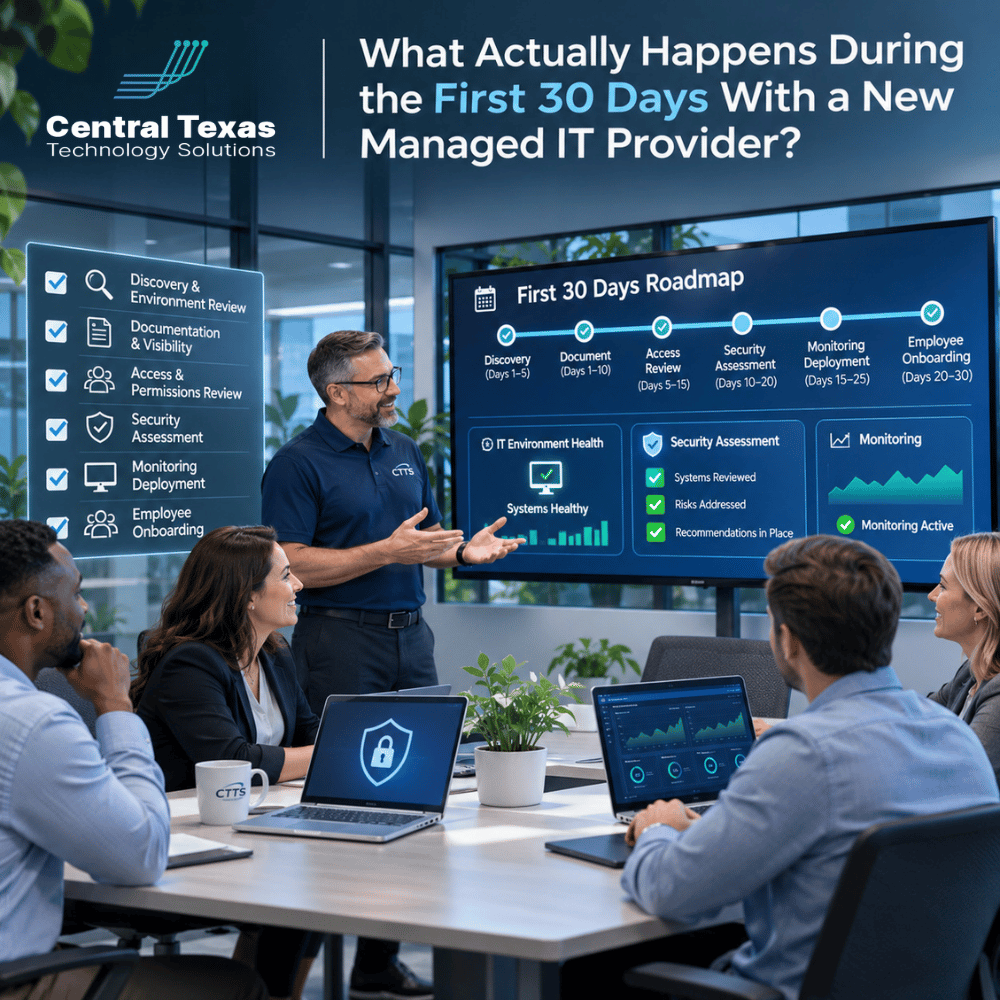
Here's what you should expect during your first 30 days with a new managed IT provider.
Days 1 Through 5: IT Discovery and Understanding Your Business
A successful IT transition begins with understanding your business, not immediately installing new software or replacing equipment.
Your new managed IT provider should start with a discovery process that examines your current technology environment, business operations, and existing challenges.
This typically includes:
-
Business needs: Understanding your operations, growth plans, critical applications, and employee workflows.
-
Technology inventory: Identifying computers, servers, networking equipment, software, and cloud services.
-
Current IT problems: Reviewing recurring support issues, performance complaints, and unresolved technical concerns.
-
Vendor relationships: Identifying internet providers, software vendors, telecommunications providers, and other technology partners.
-
Existing documentation: Gathering network diagrams, system configurations, licensing information, and support procedures.
This process helps the new provider understand what works, what needs improvement, and which systems require special attention during the transition.
For example, a healthcare practice may rely on specialized patient management software, while a construction company may need reliable access to project files from multiple job sites.
A good provider recognizes these differences and develops an onboarding plan around the way your business actually operates.
The goal during these first few days is simple: Understand your environment before making changes that could affect it.
Days 6 Through 10: Documentation, Access Reviews, and IT Security Assessments
Once discovery is underway, the next priority is establishing visibility and control over your technology.
One of the biggest challenges when changing IT providers is incomplete documentation. Your previous provider may have managed everything for years, but important passwords, configurations, and administrative details may not be readily available.
Your new provider should systematically collect and verify critical information, including:
-
Administrative access to servers, computers, and network equipment.
-
Microsoft 365 and other cloud application accounts.
-
Domain registrations, DNS settings, and internet service information.
-
Software licenses, subscriptions, and renewal dates.
-
Existing backup systems and recovery procedures.
-
Security tools, firewall configurations, and user permissions.
Reviewing Access and Identifying Security Risks
An IT transition also creates an opportunity to examine who has access to your systems.
Former employees, outdated vendor accounts, and unnecessary administrative privileges can create security vulnerabilities that go unnoticed for years.
Your new provider should perform an initial security assessment to identify these risks and recommend appropriate changes.
This may include reviewing multifactor authentication, endpoint protection, email security, password policies, and administrative permissions.
For businesses in legal services, healthcare, and financial or other professional services, these reviews are especially important because of confidentiality obligations and regulatory requirements.
However, security improvements should be carefully coordinated. Removing an account or changing a configuration without understanding its purpose could interrupt an essential business application.
A well-managed transition prioritizes security without making unnecessary changes that could disrupt operations.
Days 11 Through 15: Deploying IT Monitoring and Security Tools
After establishing access and understanding the environment, your new provider can begin deploying the tools needed to manage your technology proactively.
This is where the transition starts moving from discovery into active management.
Depending on your environment, deployment may include:
-
Remote monitoring and management: Installing software that helps identify computer problems, hardware issues, and system health concerns.
-
Endpoint security: Deploying protection against malware, ransomware, and other threats.
-
Patch management: Establishing procedures for keeping operating systems and applications updated.
-
Backup monitoring: Verifying that existing backups are completing successfully and identifying recovery gaps.
-
Network monitoring: Configuring visibility into important network equipment and connectivity.
These tools allow your provider to identify potential problems before employees experience significant disruptions.
For example, monitoring software might detect a server running low on storage space. Instead of waiting until the server stops functioning, your IT team can investigate and address the issue before it affects productivity.
This proactive approach is central to CTTS's Complete Care Coverage, which focuses on ongoing maintenance, security, and strategic technology management rather than simply responding when something breaks.
Will Employees Notice These Changes?
In many cases, monitoring and security software can be installed remotely with minimal employee involvement.
Some installations may require a restart or brief interruption, but these activities should be scheduled around business needs whenever possible.
A responsible provider tests deployment procedures, coordinates changes, and communicates any expected interruptions before they occur.
Days 16 Through 20: Employee Onboarding and Help Desk Transition
Technology is only part of a successful IT transition. Your employees also need to know where to turn when they need assistance.
During this stage, your new provider should introduce employees to its IT help desk services and explain how support requests will be handled.
Employee onboarding typically covers:
-
How to submit an IT support ticket.
-
Who to contact for urgent technical problems.
-
Available support channels, such as phone, email, or a support portal.
-
How remote support sessions work.
-
What employees should expect when reporting technical issues.
The provider should also confirm that employee devices are properly enrolled in its management systems and that remote support tools function correctly.
Making the Change Easy for Employees
Employees shouldn't have to learn an entirely new way of working just because the company changes IT providers.
A good onboarding process keeps instructions simple and provides clear communication about what's changing.
For example, employees might receive a short welcome email introducing the new IT team, explaining how to request assistance, and providing contact information.
Your new provider may also offer security awareness training to help employees recognize phishing attempts, suspicious attachments, and other common threats.
The objective is to make employees comfortable with the new support relationship while maintaining productivity.
Days 21 Through 30: Testing, Optimization, and Long-Term IT Planning
By the final stage of the initial onboarding period, your new provider should have a much clearer understanding of your technology environment.
The focus now shifts toward validating the transition, resolving outstanding issues, and developing a longer-term improvement plan.
Verifying That Everything Works
Your provider should confirm that important management and security systems are functioning correctly.
This includes checking monitoring alerts, reviewing backup status, confirming employee support access, and addressing problems discovered during deployment.
Backup verification deserves particular attention. Simply seeing that a backup job completed doesn't guarantee that critical data can be recovered.
A provider should review your data backup and recovery procedures and establish appropriate recovery testing based on your business requirements.
Creating a Technology Roadmap
The first 30 days should also provide enough information to begin identifying future technology priorities.
These might include:
-
Replacing aging computers or networking equipment.
-
Improving cybersecurity protections.
-
Addressing recurring performance problems.
-
Planning software upgrades and licensing renewals.
-
Establishing a predictable IT budget.
-
Preparing technology systems for business growth.
Not every issue needs to be fixed during the first month.
Instead, your provider should distinguish between urgent risks, operational improvements, and longer-term investments.
This helps business owners make informed decisions without facing a long list of unexpected expenses immediately after switching providers.
How a Well-Managed IT Transition Minimizes Business Disruption
One of the most common misconceptions about switching IT companies is that everything must be replaced or reconfigured immediately.
In reality, a professional transition should preserve working systems while gradually introducing better management, monitoring, and security.
Several practices make this possible.
Coordinate with the outgoing provider. When possible, the incoming provider should arrange a structured handoff that includes documentation, credentials, vendor information, and outstanding issues.
Avoid unnecessary changes. If an existing system is working properly, there may be no reason to replace it during onboarding. Improvements can be prioritized after the environment is fully understood.
Schedule potentially disruptive work carefully. Changes involving servers, firewalls, email systems, or business-critical applications should be planned and communicated in advance.
Maintain clear accountability. Your business should know which provider is responsible for support during each stage of the transition. A defined handoff date helps prevent gaps in coverage.
Establish rollback procedures. Significant configuration changes should include a plan for restoring previous settings if something doesn't work as expected.
These practices matter for businesses throughout Central Texas, whether you're managing a law firm in Austin, a manufacturing operation in Taylor, a nonprofit organization in Georgetown, or a growing professional services company in Cedar Park.
The same principle applies regardless of industry: Your IT transition should support business continuity, not put it at risk.
It's also important to recognize that 30 days is a typical initial onboarding framework, not a universal deadline. Larger organizations, complex networks, missing credentials, and specialized software may require additional time.
A trustworthy provider will explain the expected timeline, identify dependencies, and communicate progress throughout the process.
Ready to Switch IT Providers Without the Headaches?
Changing IT providers shouldn't mean putting your business operations at risk. With the right preparation, clear communication, and a structured onboarding process, the transition can be an opportunity to strengthen your technology environment.
At CTTS, we help Central Texas businesses move toward more reliable, secure, and proactive IT management.
Schedule a free consultation with CTTS and discuss what a managed IT transition could look like for your business.
Frequently Asked Questions About Switching Managed IT Providers
1. Do we have to shut down our business while switching IT providers?
Usually, no. Most discovery, documentation, monitoring deployment, and security assessments can take place while employees continue working. Some activities, such as replacing network equipment or making major configuration changes, may require scheduled downtime. A qualified managed IT provider should identify these situations in advance and coordinate work during less disruptive periods. The goal is to maintain business operations throughout the transition.
2. What if our current IT provider refuses to cooperate with the transition?
An uncooperative outgoing provider can complicate the process, but it doesn't necessarily prevent the transition. Your new provider can help identify missing documentation, recover access through authorized administrative channels, and coordinate with software vendors or service providers. However, certain systems may require additional verification or recovery procedures. Before switching, review your existing IT agreement for termination requirements, documentation obligations, and ownership of administrative credentials.
3. How long does it take to fully switch managed IT providers?
Many small and midsized businesses can complete initial onboarding within approximately 30 days, although the timeline depends on their technology environment. A company with a single office and straightforward systems may transition faster, while organizations with multiple locations, specialized applications, or extensive security requirements may need more time. The important measure isn't how quickly the transition finishes, but whether systems are properly documented, protected, monitored, and supported when responsibility changes hands.
Contact CTTS today for IT support and managed services in Austin, TX. Let us handle your IT so you can focus on growing your business. Visit CTTSonline.com or call us at (512) 388-5559 to get started!