
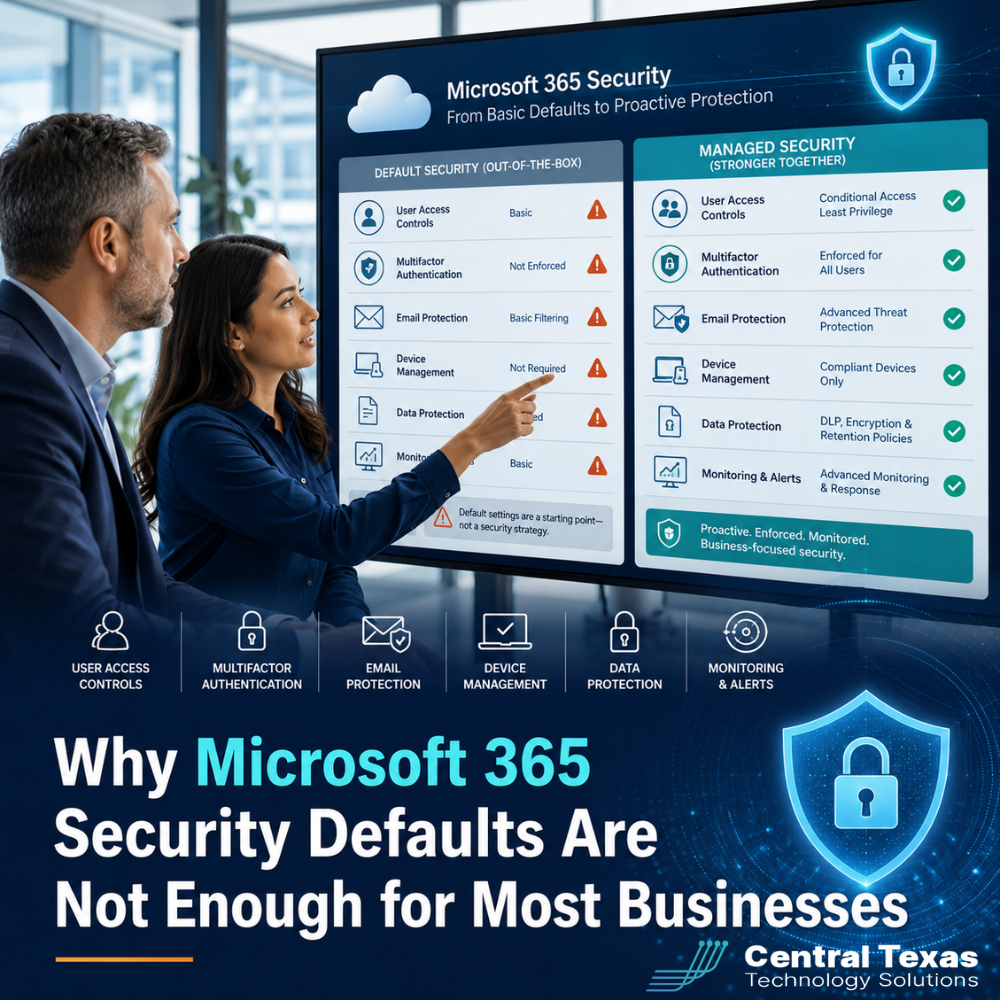
Microsoft 365 gives businesses a strong starting point for communication, file sharing, collaboration, and productivity. For many organizations, it has become the center of daily work.
But there is a problem.
Many business leaders assume that because Microsoft 365 includes built-in security settings, their environment is fully protected by default. That assumption can create a false sense of safety.
Microsoft 365 Security Defaults are helpful, but they are not a complete security strategy. They provide a basic layer of protection, not a managed, business-specific configuration. For growing businesses in Austin, Kyle, Buda, and New Braunfels, that difference matters.
Healthcare practices, legal firms, professional services companies, construction businesses, manufacturing teams, and nonprofits all rely on Microsoft 365 in different ways. Their risks are different. Their compliance needs are different. Their employees work differently. Their security settings should reflect that.
That is where managed configuration becomes essential.
What Are Microsoft 365 Security Defaults?
Microsoft 365 Security Defaults are baseline security settings designed to help protect organizations from common identity-based attacks.
They can help with important protections such as:
- Requiring multifactor authentication for certain accounts and situations
- Blocking some forms of legacy authentication
- Helping reduce exposure to common sign-in attacks
- Applying a basic level of protection without complex setup
For a very small business with simple needs, Security Defaults are better than doing nothing. They help prevent some of the most common mistakes that happen when accounts are left wide open.
But basic protection is not the same as strategic protection.
Security Defaults are designed to be broad. They are not built around your specific users, devices, locations, applications, compliance requirements, or business risk.
Why Microsoft 365 Security Defaults Fall Short
The biggest issue with Microsoft 365 Security Defaults is that they are not customized to your business.
They are a standard set of protections. That means they cannot answer important questions like:
- Should employees be allowed to access company email from personal devices?
- Should sign-ins from unfamiliar locations trigger stronger verification?
- Should executives, accounting staff, and administrators have stricter protections?
- Should contractors or temporary users have limited access?
- Should sensitive files be blocked from download on unmanaged devices?
- Should risky sign-ins be automatically reviewed or restricted?
- Should security policies change based on department, location, or job role?
For most businesses, these questions are not optional. They affect productivity, security, compliance, and business continuity.
A healthcare office may need stronger access controls because of patient data. A law firm may need tighter protection around confidential client files. A construction company may need secure mobile access from job sites. A manufacturing business may need to protect operational systems and vendor communications. A nonprofit may need practical security that protects donor data without overwhelming staff.
Security Defaults do not fully account for these differences.
Basic MFA Is Not the Same as Managed Identity Security
Multi-factor authentication, often called MFA, is one of the most important security tools in Microsoft 365. It helps prevent attackers from accessing an account with only a stolen password.
But MFA alone is not enough.
Without proper configuration, businesses can still face problems such as:
- Users approving sign-in prompts without thinking
- Attackers targeting employees with repeated MFA requests
- Weak recovery methods
- Unmanaged devices accessing sensitive data
- Admin accounts being treated the same as regular user accounts
- No clear process for reviewing risky sign-ins
Managed identity security looks beyond simply turning MFA on.
It considers who is signing in, where they are signing in from, what device they are using, what data they are trying to access, and whether the activity looks normal.
That is the difference between a lock on the front door and a monitored security system.
Why Conditional Access Matters for Microsoft 365 Security
Conditional Access allows businesses to create smarter rules for Microsoft 365 access.
Instead of treating every login the same, Conditional Access can apply different requirements based on risk. For example, a business might allow normal access from a company-owned device in Central Texas but require additional verification when someone signs in from another country.
Conditional Access can help businesses manage policies such as:
- Requiring MFA for high-risk users
- Blocking access from certain locations
- Limiting access from unmanaged devices
- Protecting administrator accounts with stricter rules
- Requiring compliant devices for sensitive applications
- Creating different rules for remote, hybrid, and office-based teams
This matters for businesses in Austin and across Central Texas because teams are no longer working from one location on one type of device.
Employees may work from the office, home, client sites, job sites, courtrooms, clinics, warehouses, or while traveling. Security Defaults do not provide the same level of control needed to manage those real-world scenarios.
Microsoft 365 Email Security Needs More Than Default Settings
Email remains one of the most common ways attackers target businesses.
Phishing emails, fake invoices, malicious attachments, spoofed senders, and credential theft attempts can all reach employees through their inboxes. Microsoft 365 includes email security tools, but the default settings are not always enough for the level of protection most businesses need.
A managed Microsoft 365 security configuration may include stronger policies for:
- Anti-phishing protection
- Anti-spam filtering
- Safe Links
- Safe Attachments
- Spoof protection
- Impersonation protection
- Quarantine review
- External sender warnings
- Executive and finance team protection
This is especially important for businesses where one mistaken click can create major disruption.
A legal office could expose confidential client communication. A healthcare provider could put protected data at risk. A construction company could fall for a fake vendor payment request. A manufacturing business could lose access to critical files during a ransomware event. A nonprofit could have donor records compromised.
Default settings are not designed to understand which emails, users, and workflows create the highest risk for your organization.
Microsoft Secure Score Is Useful, But It Still Needs Interpretation
Microsoft Secure Score can help businesses understand their security posture by showing recommended security improvements.
That is helpful, but it is not the same as having a plan.
A higher score does not automatically mean every setting is right for your business. Some recommendations may be important. Others may need to be phased in carefully so they do not interrupt productivity.
This is where many businesses get stuck.
They can see that improvements are needed, but they are not sure which changes to make first, what each setting affects, or how to avoid locking users out of critical systems.
Managed configuration turns security recommendations into a practical roadmap.
The goal is not to turn on every possible setting at once. The goal is to improve security in a way that supports the business.
Poor Microsoft 365 Configuration Can Create Business Problems
When Microsoft 365 is not configured properly, security gaps are only part of the risk.
Businesses may also deal with:
- Employees losing access at the wrong time
- Sensitive files being shared too broadly
- Old employee accounts staying active
- Personal devices accessing company data
- Weak administrator protections
- Confusing alerts that no one reviews
- No clear process for onboarding or offboarding users
- Inconsistent permissions across Teams, SharePoint, and OneDrive
These issues can create downtime, frustration, compliance concerns, and unnecessary risk.
A growing business does not need more confusion. It needs a Microsoft 365 environment that is secure, organized, and aligned with how the company actually works.
Why Managed Microsoft 365 Configuration Matters
Managed configuration means your Microsoft 365 environment is reviewed, secured, documented, and maintained by professionals who understand both technology and business operations.
It is not just about turning on security features.
It is about making sure the right people have the right access, the right policies are in place, and the system is monitored over time.
A managed approach can help your business:
- Reduce the risk of account compromise
- Protect sensitive business data
- Improve employee productivity
- Support remote and hybrid teams
- Prepare for audits or compliance reviews
- Simplify onboarding and offboarding
- Prevent small issues from becoming major disruptions
- Align Microsoft 365 with business goals
This is where CTTS helps businesses move from reactive IT support to proactive technology management.
Instead of waiting for a security problem, access issue, or compliance concern to surface, CTTS helps identify gaps, configure protections, and keep your Microsoft 365 environment aligned with your business.
Microsoft 365 Security Should Grow With Your Business
What worked when your company had five employees may not work when you have 25, 50, or 100.
As your business grows, your Microsoft 365 environment becomes more complex. You may add new users, locations, devices, departments, vendors, and compliance requirements. Without a managed strategy, permissions can become messy and security gaps can quietly grow.
That is why Microsoft 365 security should be reviewed regularly.
Your business needs to know:
- Who has access to what
- Which accounts have administrative privileges
- Which devices can connect to company data
- Which users are most at risk
- Which policies are missing or outdated
- Which alerts need attention
- Which settings no longer match the way your team works
Security Defaults are static. Your business is not.
CTTS Helps Businesses Strengthen Microsoft 365 Security
CTTS helps businesses in Austin, Kyle, Buda, New Braunfels, and across Central Texas get more from Microsoft 365 without leaving security to chance.
Our team helps configure, manage, and monitor Microsoft 365 environments so business leaders can move forward with confidence.
We help businesses:
- Review current Microsoft 365 security settings
- Identify risky configurations
- Improve identity and access controls
- Strengthen email security
- Secure Teams, SharePoint, and OneDrive
- Protect administrator accounts
- Support remote and hybrid work
- Create a practical security roadmap
CTTS is proactive, not reactive. We help prevent problems instead of simply responding after something breaks.
For healthcare, legal, professional services, construction, manufacturing, and nonprofit organizations, that kind of guidance can make the difference between assuming Microsoft 365 is secure and knowing it is configured properly.
The Bottom Line on Microsoft 365 Security Defaults
Microsoft 365 Security Defaults are a good starting point, but they are not enough for most businesses.
They do not replace a managed security strategy. They do not fully address your users, devices, data, compliance needs, remote work policies, or business goals.
Your Microsoft 365 environment should help your team work efficiently while protecting the information your business depends on.
If you are not sure whether your Microsoft 365 settings are strong enough, now is the right time to find out.
Schedule a consultation with CTTS today to review your Microsoft 365 security configuration and build a safer, more reliable technology foundation for your business.
Frequently Asked Questions About Microsoft 365 Security Defaults
Are Microsoft 365 Security Defaults good enough for a small business?
Security Defaults are better than having no baseline protection, but they are usually not enough as a business grows. Most companies need additional configuration around user access, devices, email protection, administrator accounts, and data sharing.
What is the difference between Security Defaults and Conditional Access?
Security Defaults apply a basic set of protections across the organization. Conditional Access allows more specific rules based on users, devices, locations, applications, and risk levels. Conditional Access gives businesses more control over how Microsoft 365 is accessed.
How often should Microsoft 365 security settings be reviewed?
Microsoft 365 security settings should be reviewed regularly, especially when your business adds employees, changes locations, adopts remote work, updates compliance requirements, or experiences recurring security alerts. A proactive review helps prevent small configuration issues from becoming larger business risks.
Contact CTTS today for IT support and managed services in Austin, TX. Let us handle your IT so you can focus on growing your business. Visit CTTSonline.com or call us at (512) 388-5559 to get started!
Get the answers business leaders are asking about IT services:
How Microsoft 365 Support Improves Productivity and Security
What Network Security Really Means Beyond Firewalls and Antivirus
How Ransomware Protection Works and Why Prevention Matters
When to Bring in an IT Consulting Firm Instead of Just IT Support
How Endpoint Detection and Response Protects Your Business From Modern Threats
What Multi Factor Authentication Really Does and Why It Matters More Than Ever
How Secure Cloud Migrations Work Without Disrupting Your Business
What Role AI Is Playing in Cybersecurity for Texas Businesses
How Network Visibility Tools Help Prevent Costly IT Surprises