
A stolen password should not be enough to get into your business.
But for many companies, that is still the reality.
An employee clicks a fake email. A password gets reused on another site. A login attempt comes from another state, another country, or a device your company has never seen before. If your system only asks for a username and password, the door may already be open.
That is where conditional access makes a major difference.
For growing businesses in Austin, Round Rock, Georgetown, Cedar Park, and across Central Texas, conditional access helps protect your people, data, and systems by asking a simple question before allowing someone in:
Does this login make sense?
If the answer is no, access can be blocked, challenged, or limited before damage is done.
What Is Conditional Access?
Conditional access is a security approach that decides whether someone should be allowed into a system based on certain conditions.
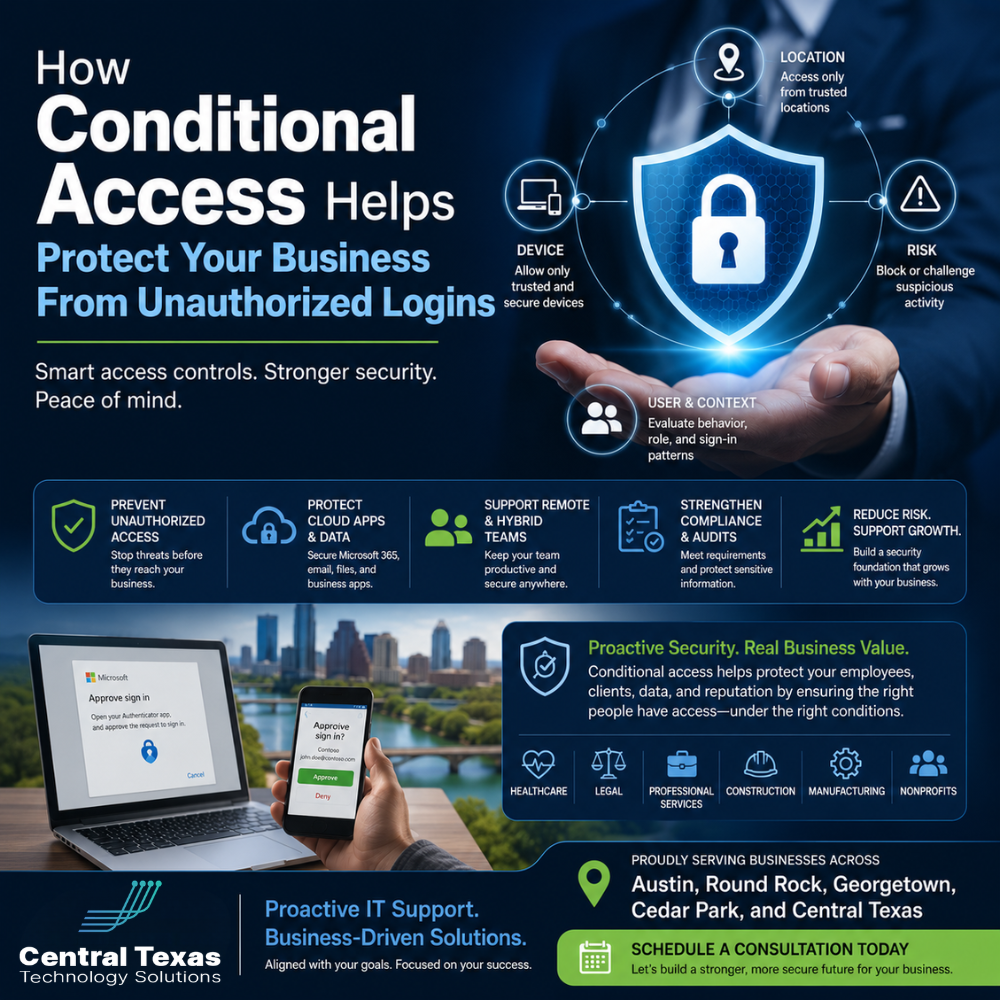
Instead of treating every login the same, conditional access looks at important details such as:
- Where the person is logging in from
- What device they are using
- Whether the login appears risky
- Whether multi-factor authentication is required
- Whether the user normally logs in this way
- Whether the device meets your security standards
In simple terms, conditional access helps your business say, “You can access this system, but only if the situation looks safe.”
That matters because today’s cybercriminals do not always break in by hacking through a firewall. Many simply log in using stolen credentials.
Why Passwords Alone Are Not Enough for Business Security
Passwords are still important, but they are no longer enough by themselves.
Employees use dozens of cloud tools, email platforms, shared files, business apps, and remote access systems. Healthcare offices, legal firms, professional services companies, construction businesses, manufacturers, and nonprofits all depend on these tools to keep work moving.
That access creates opportunity. If one password is stolen, guessed, or reused, an attacker may be able to reach email, client files, financial records, internal documents, or cloud applications.
A password cannot tell you:
- Whether the login is coming from a trusted location
- Whether the device is managed by your company
- Whether the login behavior is unusual
- Whether the user is under attack
- Whether the request should require extra verification
Conditional access adds that missing layer of judgment.
How Location-Based Access Controls Help Reduce Risk
Location-based access controls help your business decide whether a login should be allowed based on where it is coming from.
For example, a business in Austin may expect employees to log in from Central Texas, approved remote work locations, or known travel areas. If a login suddenly comes from another country at 2:00 a.m., that should raise a red flag.
With conditional access, your business can create rules such as:
- Block logins from high-risk countries
- Require extra verification outside trusted locations
- Allow access only from approved regions
- Limit administrative access to specific locations
- Flag unusual travel patterns
This does not mean your team cannot work remotely. It means your systems can tell the difference between normal remote work and suspicious access.
For a legal office handling confidential case files, a healthcare practice protecting patient information, or a nonprofit managing donor records, that distinction matters.
How Device-Based Access Controls Protect Company Data
Device-based access controls help answer another important question:
Is this device safe enough to access company systems?
An employee may know their password, but that does not mean every device they use should have access to sensitive data.
Conditional access can help ensure that company systems are accessed only from devices that meet your security requirements. That may include:
- Company-managed laptops
- Devices with current security updates
- Devices with endpoint protection installed
- Devices that are encrypted
- Devices that have not been reported lost or stolen
- Devices that comply with company policies
This is especially valuable for businesses with remote or hybrid teams.
A construction company may have project managers logging in from job sites. A manufacturer may have supervisors accessing systems from multiple facilities. A professional services firm may have consultants working from client locations. Conditional access helps protect the business while still allowing work to happen.
The goal is not to make access difficult. The goal is to make unsafe access harder.
How Risk-Based Access Controls Stop Suspicious Logins
Risk-based access controls look for signs that a login may not be legitimate.
For example, a login may be considered risky if:
- It comes from an unfamiliar location
- It follows a failed login pattern
- It appears to come from a known malicious source
- It happens immediately after a login from a distant location
- It uses a device the company does not recognize
- It matches behavior commonly associated with stolen credentials
When risk is detected, conditional access can automatically respond.
Depending on the situation, your system may:
- Require multi-factor authentication
- Force a password reset
- Block the login entirely
- Limit access to sensitive systems
- Alert your IT team for review
This helps your business move from reactive security to proactive protection.
Instead of waiting until someone reports a breach, conditional access can help stop suspicious activity at the front door.
The Business Value of Conditional Access
Conditional access is not just an IT feature. It is a business protection strategy.
When properly configured, it helps protect:
- Productivity
- Client trust
- Compliance efforts
- Sensitive data
- Business continuity
- Employee accounts
- Cloud systems
- Financial records
For business leaders, the value is simple. Conditional access helps reduce the chance that one stolen password turns into a major business disruption.
That matters for healthcare organizations preparing for audits, legal firms protecting client confidentiality, nonprofits managing donor information, manufacturers relying on uptime, construction companies coordinating active projects, and professional services firms supporting clients every day.
Unauthorized logins can lead to downtime, data loss, reputation damage, and costly recovery work. Conditional access helps reduce those risks without requiring every employee to become a cybersecurity expert.
Conditional Access and Multi-Factor Authentication Work Better Together
Multi-factor authentication, often called MFA, requires users to verify their identity in more than one way. For example, an employee may enter a password and then approve a login using an authentication app.
MFA is important, but conditional access makes it smarter.
Without conditional access, MFA may be applied the same way every time. With conditional access, your business can apply MFA based on the situation.
For example:
- A login from the office may be allowed normally
- A login from a new city may require MFA
- A login from an unmanaged device may be blocked
- A login from a risky location may be denied
- An admin login may always require stronger verification
This helps balance security and convenience.
Your employees can work efficiently when conditions are normal, while your systems add extra protection when something looks risky.
Why Conditional Access Matters for Microsoft 365 Security
Many Central Texas businesses rely on Microsoft 365 for email, files, Teams, SharePoint, and daily collaboration. That makes Microsoft 365 one of the most important places to protect.
If an attacker gets into a Microsoft 365 account, they may be able to:
- Read email
- Send fraudulent messages
- Access shared files
- Download sensitive documents
- Reset passwords
- Impersonate employees
- Launch phishing attacks against clients or vendors
Conditional access helps reduce that risk by adding rules around who can access Microsoft 365, from where, on what device, and under what conditions.
For many businesses, this is one of the most practical ways to improve cloud security without slowing down the entire team.
Common Conditional Access Mistakes Businesses Make
Conditional access is powerful, but it needs to be planned carefully.
Some businesses make the mistake of turning on rules without understanding how employees actually work. Others leave policies too loose, which limits the value. Some apply rules only to executives while ignoring everyday users who may have access to important data.
Common mistakes include:
- Not protecting administrator accounts first
- Forgetting to include remote workers
- Allowing unmanaged personal devices without limits
- Failing to test policies before enforcing them
- Creating rules that frustrate employees
- Ignoring alerts from risky sign-ins
- Not reviewing access policies as the business grows
Security should not create chaos. A thoughtful conditional access strategy protects the business while supporting how your team actually works.
How CTTS Helps Businesses Use Conditional Access the Right Way
CTTS helps businesses across Austin, Round Rock, Georgetown, Cedar Park, and Central Texas protect their systems with practical, well-planned security strategies.
We do not believe good IT support should wait for something to break. We help businesses prevent problems before they become expensive disruptions.
With conditional access, CTTS can help your organization:
- Review current login and security settings
- Identify risky access gaps
- Protect Microsoft 365 accounts
- Create location-based access rules
- Apply device-based access policies
- Configure risk-based login protection
- Strengthen MFA policies
- Support remote and hybrid teams
- Align access controls with business goals
- Review policies as your company grows
The result is a security approach that protects your people without making daily work harder than it needs to be.
Conditional Access Helps Your Business Move Forward With Confidence
Your employees need access to the tools that help them serve clients, manage projects, support patients, protect legal matters, run operations, and keep the business moving.
But access should never be wide open.
Conditional access helps your business create smarter rules around who gets in, when they get in, where they get in from, and what devices they use. It gives your organization a stronger defense against unauthorized logins while still supporting the way modern teams work.
If your business is growing, hiring, expanding remote work, preparing for an audit, or relying more heavily on cloud systems, now is the time to review your access controls.
CTTS can help you build a proactive security strategy that protects your business before a stolen password turns into a serious problem.
Schedule a consultation today to learn how conditional access can help protect your business from unauthorized logins.
Frequently Asked Questions About Conditional Access
What is conditional access in simple terms?
Conditional access is a security tool that decides whether someone should be allowed into your business systems based on factors like location, device, user risk, and login behavior. It helps block or challenge suspicious logins before they become security problems.
Does conditional access replace multi-factor authentication?
No. Conditional access works with multi-factor authentication. MFA confirms a user’s identity, while conditional access decides when extra verification is needed based on risk, location, device, or other conditions.
Is conditional access only for large companies?
No. Small and midsize businesses can benefit from conditional access, especially if they use Microsoft 365, support remote workers, handle sensitive data, or need stronger protection against unauthorized logins. Healthcare, legal, professional services, construction, manufacturing, and nonprofit organizations can all use conditional access to improve security.
Contact CTTS today for IT support and managed services in Austin, TX. Let us handle your IT so you can focus on growing your business. Visit CTTSonline.com or call us at (512) 388-5559 to get started!
Make your next IT decision with confidence. Start with these insights:
How Microsoft 365 Support Improves Productivity and Security
What Network Security Really Means Beyond Firewalls and Antivirus
How Ransomware Protection Works and Why Prevention Matters
When to Bring in an IT Consulting Firm Instead of Just IT Support
How Endpoint Detection and Response Protects Your Business From Modern Threats
What Multi Factor Authentication Really Does and Why It Matters More Than Ever
How Secure Cloud Migrations Work Without Disrupting Your Business
What Role AI Is Playing in Cybersecurity for Texas Businesses
How Network Visibility Tools Help Prevent Costly IT Surprises