
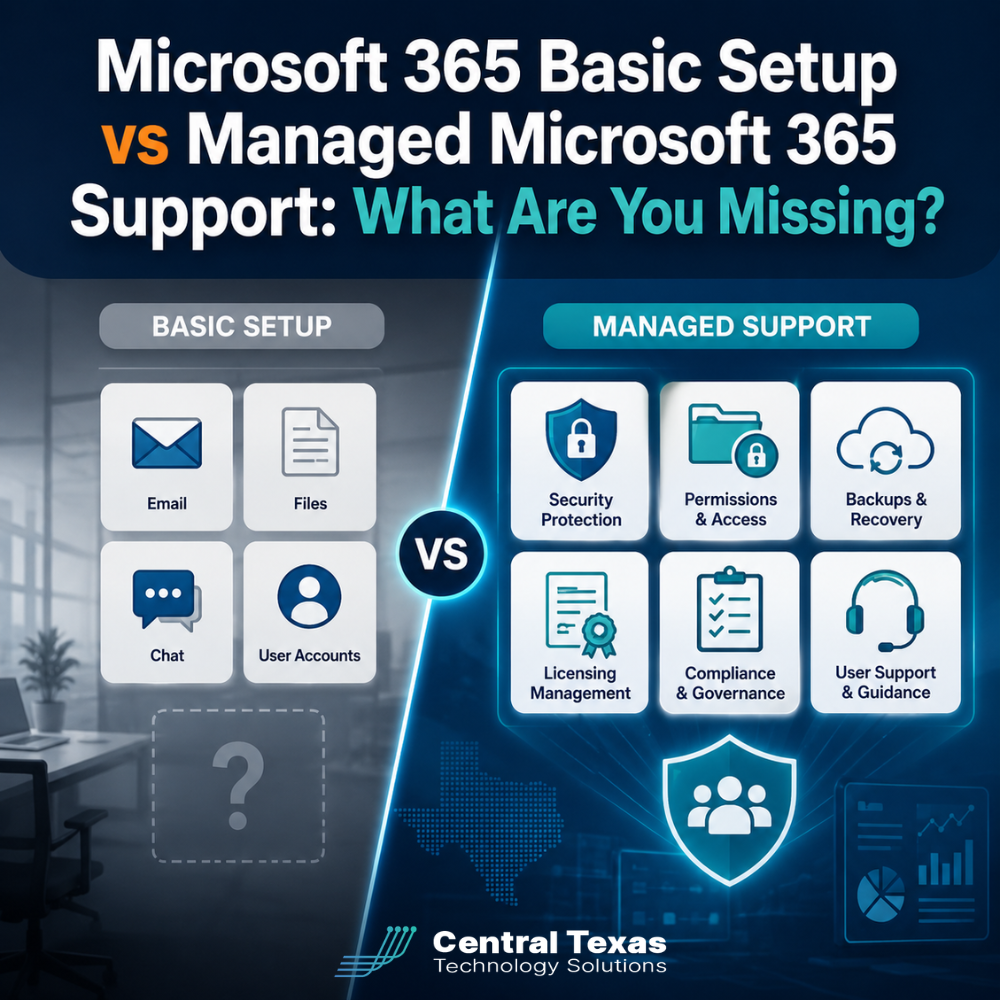
Microsoft 365 is easy to buy, but it is not always easy to manage well.
A basic setup may give your employees email, Teams, OneDrive, and access to familiar Office applications. That can feel complete until someone clicks a phishing link, sensitive files are shared with the wrong person, a former employee still has access, or important data disappears.
For businesses in Austin, Georgetown, Belton, and Temple, the real question is not whether Microsoft 365 is installed. The question is whether it is configured, protected, monitored, and supported in a way that helps the business operate safely.
Managed Microsoft 365 support closes the gap between simply having the platform and using it as a secure business system.
What Is Included in a Basic Microsoft 365 Setup?
A basic Microsoft 365 setup usually focuses on getting users online quickly. It may include:
- Creating employee accounts
- Assigning licenses
- Setting up Outlook email
- Installing Microsoft Office applications
- Enabling Teams and OneDrive
- Connecting mobile devices
These steps are necessary, but they are only the starting point.
A basic setup may not include ongoing security monitoring, permission reviews, backup planning, license optimization, compliance controls, or help when employees have problems. Settings are often left at their defaults, even when those defaults do not match the company’s risks or workflow.
That approach can work for a short time. As the business grows, the gaps become harder to ignore.
Managed Microsoft 365 Security Protects More Than Email
Microsoft 365 stores some of your most valuable business information, including email, financial documents, contracts, client records, internal conversations, and employee files.
A basic setup may rely on passwords and standard spam filtering. Managed Microsoft 365 security takes a more deliberate approach.
Common protections may include:
- Multifactor authentication
- Conditional access policies
- Secure sign-in rules
- Advanced email filtering
- Device access controls
- Account activity monitoring
- Protection against suspicious forwarding rules
- Alerts for unusual login behavior
These controls help reduce the risk of phishing, business email compromise, stolen passwords, and unauthorized access.
For a healthcare organization, one compromised account could expose patient information. A legal firm could lose control of confidential case files. A manufacturer or construction company could face invoice fraud or supply chain disruption. Professional services firms and nonprofits may also hold financial, donor, employee, or client information that criminals can use.
CTTS helps businesses apply security controls based on their actual needs instead of relying on a one-size-fits-all configuration.
Microsoft 365 Permissions Need Ongoing Management
Permissions determine who can access files, mailboxes, Teams channels, SharePoint sites, and other company resources.
During a basic setup, employees are often given broad access because it is faster and easier. Over time, those permissions can become difficult to track.
Common problems include:
- Employees retaining access after changing roles
- Former employees remaining connected to shared resources
- Confidential files being shared through public links
- Guests receiving more access than intended
- Teams and SharePoint sites being created without oversight
- Sensitive documents being stored in the wrong location
Managed Microsoft 365 support includes reviewing and maintaining access based on job responsibilities.
A growing business should not rely on employees to remember every folder, mailbox, and system that needs to be updated when someone joins, changes positions, or leaves the company. A consistent onboarding and offboarding process helps protect information and reduce confusion.
The goal is simple: employees should have access to what they need and nothing more.
Microsoft 365 Backup Is Often Misunderstood
Many business owners assume Microsoft 365 automatically provides a complete backup of everything stored in the platform.
Microsoft provides tools for availability, retention, and recovery, but those features may not replace a dedicated backup strategy. Deleted files, accidental changes, malicious activity, or retention policy mistakes can still create serious problems.
A separate Microsoft 365 backup can provide additional protection for:
- Exchange Online email
- OneDrive files
- SharePoint documents
- Teams data
- Calendars and contacts
Managed support helps determine what needs to be backed up, how long data should be retained, and how quickly it can be restored.
Consider a nonprofit employee who accidentally deletes a folder containing grant documentation. A construction company could lose project files after an account is compromised. A legal or healthcare office may need access to historical records long after a user account has been removed.
Backup planning supports business continuity by making recovery more predictable.
Microsoft 365 Licensing Should Match How Employees Work
Microsoft offers many licensing options, and the differences are not always obvious.
A basic setup may assign the same license to every employee. That can lead to paying for features people do not use or failing to provide security tools certain employees need.
Managed Microsoft 365 support can help answer questions such as:
- Which employees need desktop Office applications?
- Who only needs email and browser access?
- Which users need stronger security and device management?
- Are former employees still consuming licenses?
- Are multiple subscriptions providing overlapping features?
- Does the current license support compliance requirements?
Licensing should support the employee’s role, the company’s risk level, and the tools needed to do the job.
For example, a field employee at a construction company may have different needs from a finance manager. A physician, attorney, engineer, or nonprofit administrator may need additional security or retention features because of the information they handle.
CTTS reviews licensing as part of the broader technology strategy, helping businesses avoid both unnecessary spending and dangerous capability gaps.
Microsoft 365 Compliance Requires More Than Turning on Features
Microsoft 365 includes tools that can support compliance, but purchasing the platform does not automatically make a business compliant.
Compliance depends on how systems are configured, how information is handled, and whether policies are consistently followed.
Managed Microsoft 365 support may help businesses address:
- Data retention requirements
- Email archiving
- Access logging
- Device security
- Data loss prevention
- Secure file sharing
- User activity reporting
- Documentation for audits
Healthcare organizations may need to protect regulated patient information. Legal firms must safeguard confidential client data. Manufacturers may have contractual or cybersecurity requirements. Professional services companies, construction firms, and nonprofits may also need to meet insurance, grant, vendor, or client expectations.
CTTS helps align Microsoft 365 controls with the organization’s responsibilities. Technology cannot replace good policies, but it can make those policies easier to follow and enforce.
User Support Keeps Small Problems From Becoming Business Disruptions
Even a well-configured Microsoft 365 environment will generate support questions.
Employees may struggle with:
- Outlook not syncing
- Missing email
- Teams meeting problems
- OneDrive file conflicts
- Password resets
- Shared mailbox access
- Mobile device setup
- SharePoint navigation
- Calendar permissions
Without managed support, these issues may fall to an office manager, business owner, or employee who happens to be comfortable with technology.
That creates delays and pulls people away from their actual responsibilities.
Managed Microsoft 365 support gives employees a clear place to get help. It also allows recurring problems to be identified and corrected instead of repeatedly patched.
CTTS does more than respond to individual tickets. Our team looks for patterns, improves configurations, trains users, and helps the business get more value from the platform.
Basic Setup Gets You Started. Managed Support Keeps You Protected.
A basic Microsoft 365 setup provides access to useful tools. Managed Microsoft 365 support helps ensure those tools remain secure, organized, cost-effective, and aligned with the business.
The difference becomes especially important as your company adds employees, serves more clients, stores more information, or faces stronger security and compliance expectations.
CTTS provides proactive Microsoft 365 management for organizations across Central Texas. We help businesses improve security, manage permissions, protect data, control licensing costs, support compliance goals, and give users the help they need.
Get More From Microsoft 365
Your business should not have to discover a Microsoft 365 gap during a security incident, audit, employee departure, or data loss event.
Schedule a consultation with CTTS to review your Microsoft 365 environment and identify where stronger security, better management, or improved user support could reduce risk.
Frequently Asked Questions
Does Microsoft 365 Include Built-In Security?
Microsoft 365 includes security features, but the available tools depend on your license and configuration. Many important protections must be enabled, customized, and monitored. Managed support helps ensure security settings match your company’s users, devices, data, and risks.
Do We Really Need a Separate Microsoft 365 Backup?
A separate backup provides an additional recovery option for email, OneDrive, SharePoint, and Teams data. It can help protect against accidental deletion, malicious activity, retention mistakes, and other data loss situations. The right backup approach depends on your recovery and retention needs.
Can Managed Microsoft 365 Support Reduce Licensing Costs?
It often can. A license review may uncover inactive accounts, unnecessary subscriptions, or users assigned features they do not need. It can also identify employees who need stronger security or management capabilities. The goal is to match each license to the user’s role and the company’s requirements.
Contact CTTS today for IT support and managed services in Austin, TX. Let us handle your IT so you can focus on growing your business. Visit CTTSonline.com or call us at (512) 388-5559 to get started!
Explore these expert insights before making your next IT decision:
Cloud First IT Consulting vs Traditional IT Infrastructure
Fully Managed IT vs Co Managed IT: Which Model Fits Your Business Best?
IT Generalists vs IT Specialists: What Does Your Business Really Need?
Should You Standardize Your Technology Stack or Stay Flexible?
One IT Vendor vs Multiple Vendors: Which Approach Reduces Risk?
Is It Better to Upgrade Your Current Systems or Start Fresh?
Cloud Backup vs Local Backup: Which Does Your Business Need?
Managed IT Services vs Hiring One IT Person: Which Is Safer for a Growing Business?
Cybersecurity Software vs Cybersecurity Strategy: What Is the Difference?
Hourly IT Support vs Monthly Managed IT Services: Which Gives You Better Control?