
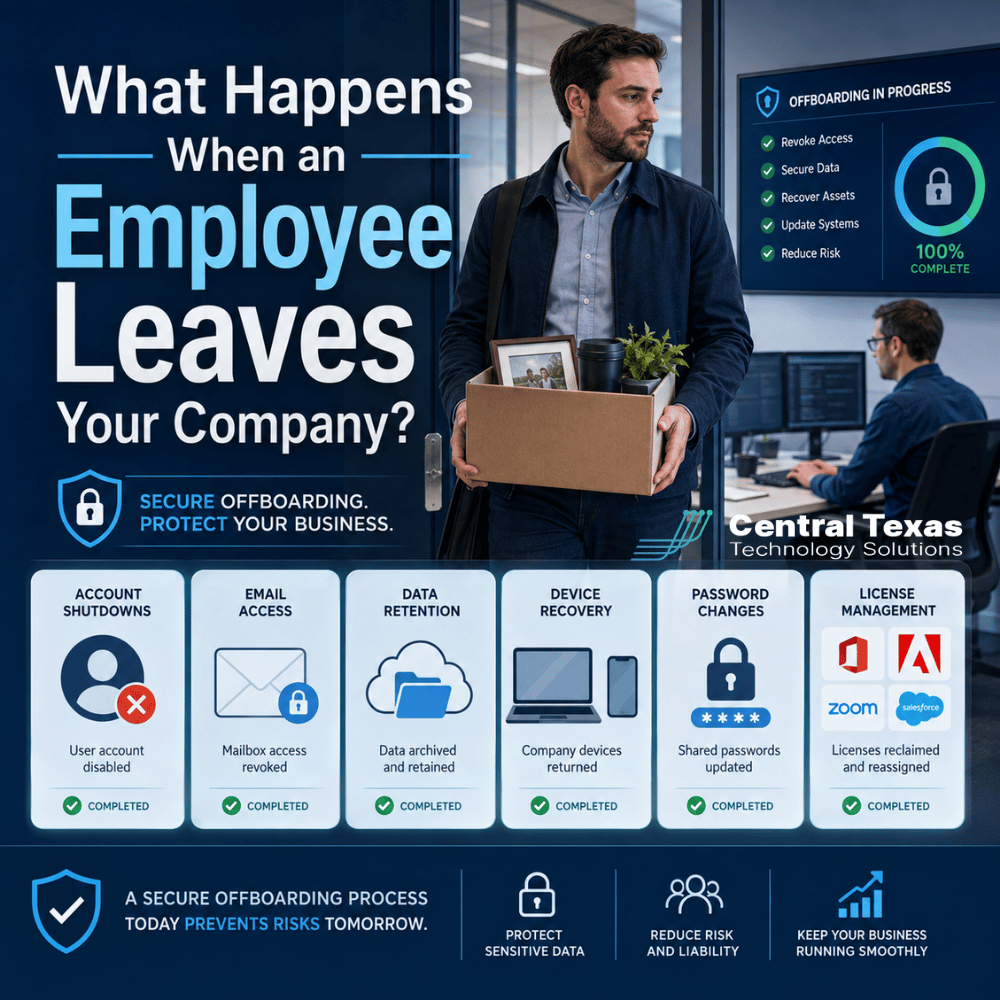
When an employee leaves, most business owners think first about replacing that person, redistributing responsibilities, and keeping work moving. But there is another issue that deserves immediate attention: what happens to that employee's technology access?
A former employee may still have access to email, Microsoft 365, cloud applications, shared files, company devices, or passwords long after their last day if offboarding is not handled correctly.
For businesses in Austin, Georgetown, Cedar Park, and Temple, a consistent IT offboarding process can help protect sensitive information, control software costs, and prevent former employees from becoming an unnecessary security risk.
Why Employee Offboarding Should Include an IT Checklist
Employee offboarding should be treated as a security process, not simply an HR task.
When someone leaves, your company needs to know exactly which systems, devices, applications, and information that person could access. Then those connections need to be reviewed and removed in an organized way.
This is especially important for businesses handling sensitive or regulated information. Healthcare organizations may need to protect patient data. Legal and professional services firms often store confidential client files. Construction and manufacturing companies may have pricing, project, vendor, or proprietary information that should not leave with an employee. Nonprofits also need to protect donor records, financial information, and internal documents.
A strong offboarding process reduces the chance that something important gets overlooked.
Account Shutdowns Should Happen at the Right Time
One of the first steps is disabling the employee's accounts.
That may include:
- Microsoft 365
- Google Workspace
- VPN access
- Cloud applications
- Accounting systems
- CRM platforms
- File-sharing services
- Remote desktop access
- Line-of-business applications
Timing matters.
For a planned departure, IT can coordinate with management so access is removed at the appropriate time on the employee's final day. For an unexpected or involuntary departure, access may need to be disabled immediately.
Simply changing one password is rarely enough. Most employees use multiple systems, and some applications may allow them to remain signed in through existing sessions or mobile devices.
A managed IT provider can maintain an inventory of those systems so the business is not relying on someone's memory during a stressful transition.
What Happens to the Employee's Email?
Email creates one of the most common offboarding questions.
Deleting an email account immediately may cause problems. The account could contain customer conversations, contracts, project details, invoices, scheduling information, or other business records that someone still needs.
Instead, businesses often need a transition plan.
Depending on the platform and company policy, that may involve:
- Blocking the former employee from signing in
- Preserving the mailbox
- Giving an authorized manager access
- Forwarding new messages temporarily
- Setting an automatic reply with a new contact
- Converting the mailbox to another account type when appropriate
The goal is to separate the employee's access from the company's need to retain the information.
For example, if an account manager leaves a professional services company, the owner may still need months of client correspondence. Disabling the employee's login protects the company without immediately destroying valuable business records.
Data Retention Needs a Plan
The same principle applies to files.
An employee may have information stored in OneDrive, SharePoint, Google Drive, local folders, a company server, or specialized business applications. Before an account is removed permanently, the company should determine what data needs to be preserved.
That might include:
- Client files
- Financial documents
- Project records
- Contracts
- Internal procedures
- Sales information
- Intellectual property
- Compliance records
Retention requirements can vary based on industry, business policy, contractual obligations, and applicable regulations.
A healthcare organization preparing for an audit will have different concerns than a construction company transferring active project files. A manufacturing business may need engineering documents preserved, while a nonprofit may need donor and grant records maintained.
The important thing is to make retention decisions intentionally instead of discovering months later that necessary files disappeared with a deleted account.
Company Devices Should Be Recovered and Secured
Laptops, phones, tablets, security keys, and other company-owned equipment should also be part of the offboarding process.
Recovering the hardware is only the beginning.
IT should review the device to determine whether it contains business data, confirm that important information has been preserved, remove the former employee's access, and prepare the device for reassignment or disposal.
For remote and hybrid employees, this can become more complicated. A laptop may be sitting in another city, and the employee may also have company email or files connected to a personal phone.
Mobile device management and other centralized tools can help IT remove business access remotely when necessary.
The goal is to make sure an employee's departure does not leave company information scattered across devices nobody is managing.
Password Changes May Still Be Necessary
Ideally, employees should each have their own usernames and passwords. Shared passwords make offboarding much more difficult.
Unfortunately, many businesses still share credentials for equipment, vendor portals, social media accounts, administrative tools, or specialized software.
If a departing employee knew a shared password, that password should generally be reviewed and changed.
Pay particular attention to:
- Administrator accounts
- Wi-Fi credentials
- Vendor portals
- Social media accounts
- Website logins
- Banking or financial systems
- Shared software accounts
- Building security or access systems
This is one reason CTTS encourages businesses to reduce shared credentials wherever possible. Individual accounts provide better accountability and make it much easier to remove one person's access without disrupting everyone else.
License Management Can Reduce Unnecessary Costs
Employee departures can also create an opportunity to clean up software licensing.
Businesses sometimes continue paying for Microsoft 365 licenses, security software, cloud applications, or other subscriptions long after an employee has left.
IT should review the former employee's licenses and determine whether they should be:
- Reassigned to a replacement employee
- Downgraded
- Converted for data retention
- Removed completely
One unused license may not seem important. Multiply that across several applications and several employee departures, though, and unnecessary costs can add up quickly.
Proactive license management helps keep technology spending aligned with the number of people who actually need access.
A Better Approach to Employee Offboarding
The safest offboarding process begins before someone leaves.
CTTS helps businesses build repeatable procedures so HR, management, and IT know exactly what needs to happen when an employee departs. Instead of scrambling to remember every account and device, the company follows a defined process.
That process can include account shutdowns, mailbox preservation, data transfers, device recovery, password reviews, software licensing, and documentation.
This is especially valuable for growing companies. As businesses add employees, locations, cloud systems, and remote workers, informal processes become harder to manage.
A proactive approach makes employee transitions smoother while reducing security risks and unnecessary expenses.
Make Employee Departures Safer and Easier
An employee leaving your company should not leave behind forgotten accounts, exposed data, unnecessary software licenses, or devices nobody can access.
CTTS helps businesses across Central Texas create proactive IT processes that protect information and keep operations moving. Whether you operate a healthcare practice, legal firm, professional services company, construction business, manufacturing operation, or nonprofit, a structured offboarding process gives you greater control over what happens to your technology when people come and go.
Schedule a free strategy call with CTTS to review your employee onboarding and offboarding process and identify gaps before they create a problem.
Frequently Asked Questions About Employee IT Offboarding
Should you immediately delete an employee's Microsoft 365 account?
Usually, no. The employee's ability to sign in should be removed promptly, but the business may need to preserve email, OneDrive files, or other information before permanently deleting the account. The correct process depends on your retention needs and Microsoft 365 configuration.
How quickly should IT access be removed when an employee leaves?
Access should normally be removed as soon as the employee is no longer authorized to use company systems. For planned departures, that may be at a specific time on the final day. For involuntary terminations or higher-risk situations, IT access may need to be disabled immediately.
What if we do not know every account the employee was using?
That is a sign your business may need better account and application management. CTTS can help identify systems, document access, and create a repeatable onboarding and offboarding process so future employee transitions are easier to manage.
Contact CTTS today for IT support and managed services in Austin, TX. Let us handle your IT so you can focus on growing your business. Visit CTTSonline.com or call us at (512) 388-5559 to get started!
Get the answers business leaders are asking about IT services:
What Happens During a Routine IT Maintenance Cycle?
How Backup and Disaster Recovery Plans Work in Real World Scenarios
What Is an IT Roadmap and Why Every Growing Business Needs One
What Happens During an IT Assessment and Why Does It Matter?
How IT Documentation Protects Your Business From Confusion and Downtime
What Is Vendor Management and Why Should Your IT Partner Handle It?
How a Proactive IT Partner Plans for Business Growth
What Happens Behind the Scenes When CTTS Monitors Your Network?