
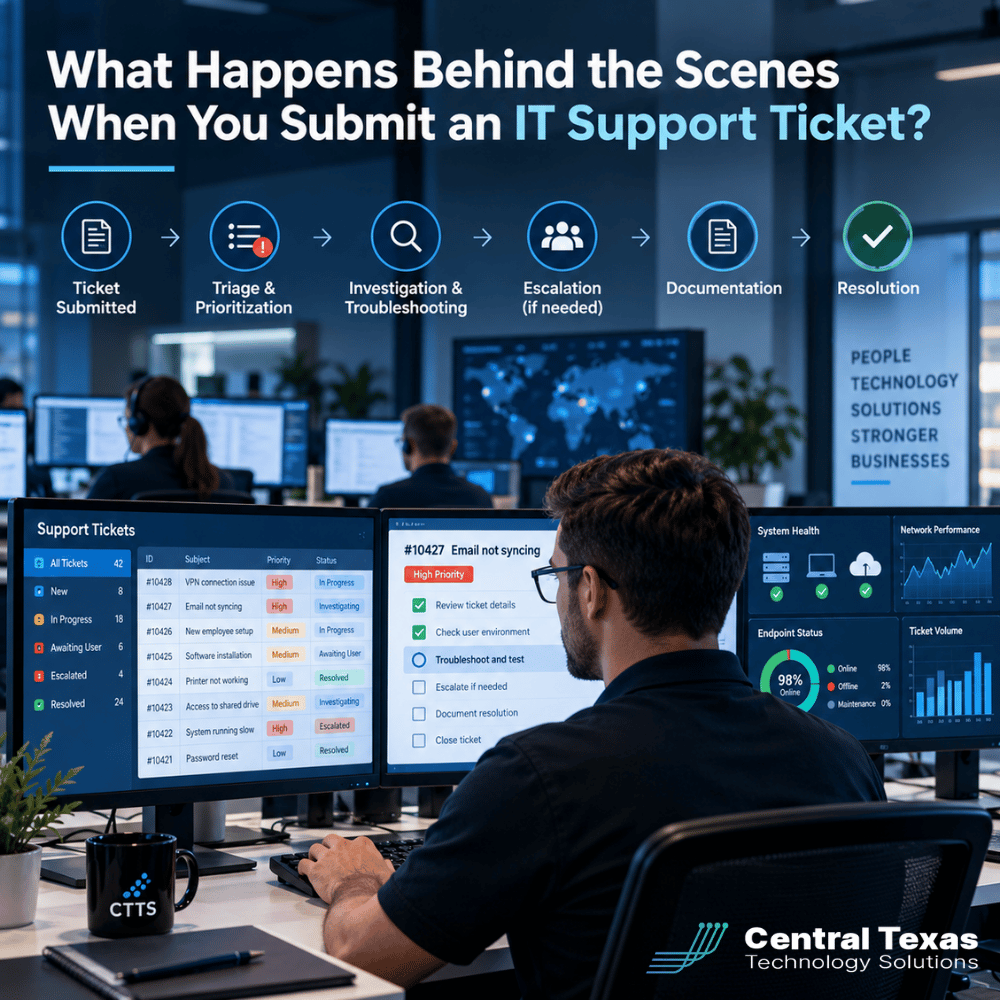
 When an employee submits an IT support ticket, they usually have one goal: get the problem fixed so they can return to work. Whether it's a computer that won't start, an email account that stopped working, or a business application that's suddenly unavailable, every minute of disruption can affect productivity.
But what actually happens after someone clicks Submit?
A well-managed IT support process involves much more than assigning a technician and fixing an issue. Behind the scenes, experienced IT providers evaluate urgency, investigate causes, coordinate resources, document solutions, and look for patterns that could signal larger problems.
Understanding this process helps business leaders recognize the difference between an IT provider that simply responds to problems and one that actively works to prevent them.
1. IT Support Ticket Triage: Understanding the Problem Before Taking Action
The first step in handling an IT support ticket is called triage. This is where the IT support team reviews the request, identifies the type of problem, and determines what needs to happen next.
When a ticket enters the system, the IT help desk typically evaluates several details:
-
Who is affected? Is the issue limited to one employee, an entire department, or the whole organization?
-
What isn't working? Is it a computer, network connection, software application, or business service?
-
What is the business impact? Can the employee continue working, or has an important operation stopped?
-
Is there a security concern? Could the issue involve suspicious activity, unauthorized access, or potential data loss?
-
What information is available? Are there error messages, screenshots, or recent changes that could help identify the cause?
This initial review helps prevent important issues from getting buried beneath routine requests.
For example, an employee who needs a new printer installed has a legitimate support request. However, a server outage preventing an entire accounting department from accessing financial records requires a different level of attention.
Effective triage helps ensure the right problems reach the right people as quickly as possible.
2. How IT Support Tickets Are Prioritized
Not every IT support ticket carries the same urgency. Mature IT providers use defined priority guidelines to determine which issues require immediate attention and which can be scheduled.
Priority is generally based on two factors: impact and urgency.
Impact measures how many people or business operations are affected. Urgency considers how quickly the situation must be addressed to avoid additional disruption.
A typical prioritization framework might look like this:
| Priority | Example | Typical Handling |
|---|---|---|
| Critical | Company-wide network outage or active cybersecurity incident | Immediate escalation and coordinated response |
| High | Essential business application unavailable to a department | Expedited troubleshooting |
| Medium | One employee cannot access a necessary application | Standard support queue with defined response targets |
| Low | Software installation or routine configuration request | Scheduled according to service commitments |
Actual response targets depend on the provider's service agreement and the nature of the incident.
This approach matters because the order in which tickets arrive should not automatically determine the order in which they receive attention.
For businesses in Austin and Round Rock, where employees often depend on cloud applications, shared networks, and remote access, proper prioritization can make a meaningful difference in limiting operational disruption.
A mature provider also reevaluates priorities as new information becomes available. An issue initially affecting one employee might become critical if troubleshooting reveals that the entire organization is at risk.
3. IT Troubleshooting: Finding the Cause Instead of Guessing
Once a ticket is categorized and prioritized, troubleshooting begins.
A technician reviews the information submitted, checks available monitoring tools, examines system logs, and may contact the employee for additional details.
Rather than immediately making changes, experienced technicians follow a structured process to narrow down the possible causes.
For example, when an employee cannot access Microsoft 365, the technician might investigate:
-
Whether the employee's internet connection is working.
-
Whether Microsoft is reporting a service disruption.
-
Whether the account is locked or experiencing an authentication problem.
-
Whether a recent password change or security policy is affecting access.
-
Whether other employees are experiencing similar issues.
This process helps technicians distinguish between an isolated user problem and a larger system issue.
Providers responsible for cloud computing services may also have access to administrative tools that help identify account, licensing, or configuration problems.
The objective is not simply to make the error message disappear. It is to understand why the problem occurred and select a solution that is appropriate, secure, and unlikely to introduce additional complications.
4. IT Ticket Escalation: Bringing in the Right Expertise
Some problems can be resolved quickly by a frontline support technician. Others require specialized knowledge, administrative access, or coordination with outside vendors.
This is where ticket escalation becomes important.
A mature IT provider establishes clear procedures for transferring issues to technicians with the appropriate expertise.
Common escalation scenarios include:
-
A workstation problem that turns out to involve a server or network configuration.
-
A suspected security incident requiring investigation by a cybersecurity specialist.
-
A business application failure requiring assistance from the software vendor.
-
A recurring connectivity problem that requires advanced network diagnostics.
-
A hardware failure requiring replacement equipment or manufacturer support.
Escalation should not mean starting the troubleshooting process over.
A properly maintained ticket contains the original problem description, troubleshooting steps already completed, diagnostic findings, and any changes made.
This allows the next technician to continue the investigation without repeatedly asking the employee the same questions.
Effective escalation also requires communication. Employees should know when their issue has been transferred, whether additional information is needed, and what to expect next.
For organizations in Georgetown and Cedar Park, having access to a coordinated support team can be especially valuable when a problem extends beyond routine desktop troubleshooting.
5. Documentation and Resolution: More Than Closing a Ticket
Once a technician identifies a solution, the next step is to implement it and verify that the affected service works correctly.
However, successful resolution involves more than getting a computer or application running again.
A complete ticket record should explain:
-
What problem was reported.
-
What caused the issue, if the cause was identified.
-
Which troubleshooting steps were performed.
-
What corrective action resolved the problem.
-
Whether additional monitoring or follow-up is necessary.
Documentation creates a valuable knowledge base for future support requests.
If another employee encounters the same issue, technicians can reference the previous resolution instead of repeating the entire investigation.
It also supports accountability and consistency, particularly when multiple technicians work with the same organization.
Importantly, a ticket should not be considered successfully resolved simply because the technician has completed a task. The solution should be verified against the original problem, and the employee should understand whether any additional action is required.
Sometimes the immediate issue is fixed while a broader problem remains. In those situations, the provider should document the remaining concern and establish an appropriate follow-up plan.
This distinction separates closing tickets from delivering dependable IT support.
6. How Mature IT Providers Use Ticket Data to Prevent Bigger Problems
The most valuable information in an IT ticketing system often becomes apparent after individual tickets are resolved.
Every support request contributes to a larger picture of an organization's technology environment.
Over time, recurring incidents can reveal patterns that would be difficult to recognize when examining tickets individually.
For example, imagine that employees submit repeated tickets about slow computers, dropped network connections, and difficulty accessing shared files.
A reactive provider might address each complaint separately.
A proactive provider examines the combined ticket history to determine whether the problems share an underlying cause.
Perhaps aging network equipment is creating intermittent connectivity problems. Maybe a server is running low on resources, or a recent configuration change is affecting multiple users.
By analyzing ticket trends, an IT provider can identify opportunities to improve performance, reduce recurring disruptions, and plan future technology investments.
Useful IT support metrics include:
-
Ticket volume: How many requests are submitted over a given period?
-
Recurring incidents: Which problems continue appearing after previous resolutions?
-
Resolution time: How long does it take to restore normal operations?
-
Escalation frequency: Which issues regularly require advanced technical expertise?
-
Affected systems: Which applications, devices, or services generate the most support requests?
-
Repeat disruptions: Are certain employees, departments, or locations experiencing ongoing problems?
These measurements become especially valuable when reviewed alongside business goals.
For healthcare organizations and law firms, repeated application access problems can interrupt time-sensitive work. Professional services companies may experience lost billable productivity, while construction companies and manufacturers depend on reliable connectivity between offices, jobsites, and operational systems. Nonprofits must often maintain dependable technology while working within limited budgets.
The specific challenges differ, but the underlying principle is the same: recurring IT problems should lead to investigation and improvement, not simply another round of tickets.
This is an important part of the value provided through CTTS's Complete Care Coverage.
By combining ongoing support with proactive monitoring, maintenance, and technology planning, CTTS helps organizations look beyond individual incidents and address the conditions that cause repeated disruptions.
Ticket data can also inform technology budgeting, equipment replacement schedules, and future infrastructure improvements.
7. What Business Leaders Should Expect From Their IT Support Provider
Business leaders do not need to understand every technical detail of the ticketing process. However, they should expect visibility into how support requests are handled and whether the process is improving their operations.
A dependable IT provider should be able to explain its ticket priorities, escalation procedures, communication practices, and methods for identifying recurring issues.
Business leaders should also receive meaningful reporting that connects IT activity to operational performance.
For example, a monthly report showing 150 closed tickets provides some information. But a report explaining that 35 of those tickets involved the same failing application offers something much more useful.
The second report creates an opportunity to address the underlying problem.
This is where strategic IT management begins to separate itself from basic technical support.
A mature provider should use support history to recommend practical improvements, whether that involves replacing unreliable equipment, strengthening cybersecurity protections, improving employee training, or adjusting system configurations.
The ultimate goal is not to generate impressive ticket closure statistics. It is to create a more reliable technology environment where employees encounter fewer preventable problems.
Better IT Support Starts With Understanding the Bigger Picture
An IT support ticket should represent more than a request for technical assistance. It should be part of a structured process that restores productivity, captures useful information, and helps prevent future problems.
At CTTS, we believe effective IT support should help businesses spend less time dealing with recurring technology frustrations and more time focusing on their goals.
Ready to move beyond reactive IT support? Schedule a free IT Risk Assessment and discover how a proactive approach to IT management can benefit your business.
Frequently Asked Questions About IT Support Tickets
How long should it take to resolve an IT support ticket?
Resolution time depends on the complexity, urgency, and business impact of the problem. A simple password reset might take only a few minutes, while a server failure or complicated software issue could require significantly more time. Businesses should review their provider's service level agreement to understand response commitments. Response time and resolution time are different measurements, and not every issue can be resolved within a guaranteed timeframe.
What information should employees include when submitting an IT support ticket?
Employees should describe what isn't working, when the problem started, and how it affects their ability to work. Error messages, screenshots, affected applications, and troubleshooting steps already attempted can help technicians identify the cause more quickly. Employees should also mention whether coworkers are experiencing similar problems. Sensitive information such as passwords should never be included in a support ticket.
Can an IT provider prevent problems before employees submit tickets?
Yes, some problems can be detected and addressed through proactive monitoring and maintenance before employees notice them. For example, monitoring tools may identify low storage capacity, failed backups, or equipment performance issues. However, not every problem can be predicted or prevented. The strongest approach combines proactive monitoring, preventive maintenance, employee support, and analysis of recurring ticket trends to reduce avoidable disruptions.
Contact CTTS today for IT support and managed services in Austin, TX. Let us handle your IT so you can focus on growing your business. Visit CTTSonline.com or call us at (512) 388-5559 to get started!
If you're evaluating IT providers, these resources will guide you:
How a Proactive IT Partner Plans for Business Growth
What Happens Behind the Scenes When CTTS Monitors Your Network?
What Happens When You Submit an IT Support Ticket?
How Does an IT Provider Onboard a New Employee?
What Happens When an Employee Leaves Your Company?
How Does an IT Provider Prepare Your Business for a New Office?
What Is a Technology Business Review and What Should It Accomplish?
What Actually Happens During Managed IT Services Onboarding?
How Does an IT Provider Decide What Technology Your Business Should Replace First?
How Should Your IT Provider Help Build an Annual Technology Budget?