
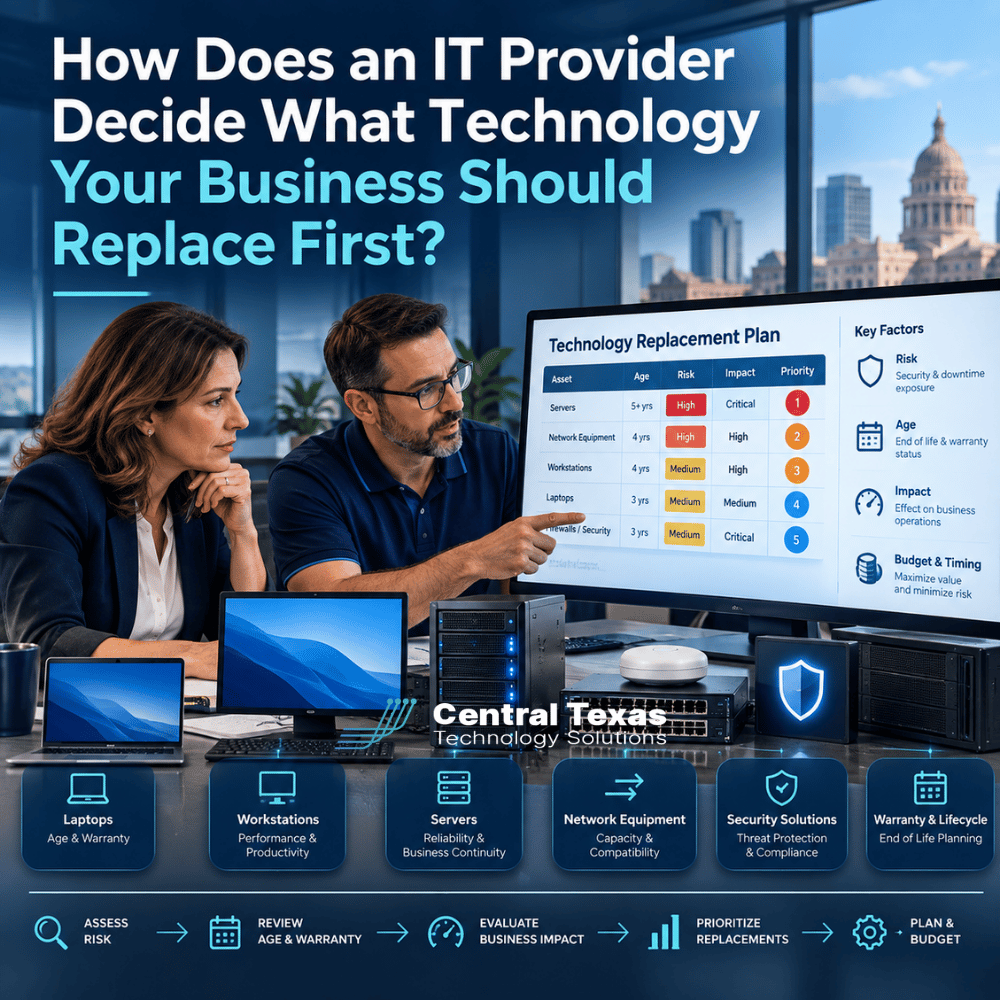
Technology eventually needs to be replaced. The harder question is deciding what should be replaced first.
For many businesses, technology replacement happens reactively. A server fails, a laptop becomes unusable, software stops working, or a vendor announces that a product is no longer supported. Suddenly, an unplanned technology expense becomes urgent.
A good IT provider should take a different approach. Instead of waiting for equipment to fail, they should use IT lifecycle planning to identify which systems create the greatest risk and develop a replacement schedule that fits your business priorities and budget.
For businesses in Austin, Georgetown, Leander, Liberty Hill, and throughout Central Texas, that means looking beyond the age of the equipment.
IT Lifecycle Planning Starts With Knowing What You Have
You cannot build an effective technology replacement plan without an accurate inventory.
Your IT provider should know the computers, servers, network equipment, software, operating systems, cloud services, and other critical technology your business depends on. That inventory should also include information such as purchase dates, warranty expiration dates, operating system versions, and support status.
From there, your provider can begin identifying technology approaching the end of its useful life.
This matters across industries. A healthcare practice may depend on computers that access patient records. A law firm may rely heavily on Microsoft 365 and document management systems. A construction company may have employees accessing applications from jobsites. Manufacturing companies may depend on computers connected to specialized equipment, while nonprofits and professional services firms may have limited budgets that make unexpected replacements particularly difficult.
The goal is not to replace everything simply because it is old. The goal is to understand what you have so you can make informed decisions about what needs attention first.
Security Risk Can Move Technology to the Top of the Replacement List
Age alone does not determine priority. Security risk often does.
A five-year-old computer that remains supported, secure, and capable of doing its job may be less urgent than a newer device running software that no longer receives security updates.
When manufacturers or software developers end support for a product, newly discovered vulnerabilities may no longer be fixed. That can create unnecessary exposure to cyberattacks.
Your IT provider should consider questions such as:
- Is the operating system still supported?
- Does the manufacturer still provide security updates?
- Can current security software run properly on the device?
- Does the equipment support modern security requirements?
- Is the system creating compliance concerns?
- Would a compromised device provide access to other important systems?
This is one reason proactive IT management is so important. The objective is to address predictable security risks before they become security incidents.
Warranty Status and Reliability Help Determine Replacement Timing
Warranty expiration does not automatically mean equipment should be replaced, but it is an important part of lifecycle planning.
Consider a critical server that is operating normally but is approaching the end of its hardware warranty. If a component fails after the warranty expires, replacement parts and vendor support could be harder or more expensive to obtain.
Now consider an employee laptop in the same situation. If the company keeps spare computers available, the business impact of that laptop failing may be relatively small.
Those two devices should not necessarily receive the same replacement priority.
A proactive IT provider evaluates both the likelihood of failure and the consequences of failure.
Recurring problems also matter. A workstation requiring repeated repairs may cost more in lost productivity and support time than replacing it. Equipment does not have to stop working completely before it becomes expensive.
Performance Should Be Measured by Business Impact
Slow technology is frustrating, but frustration is not the only reason performance matters.
Suppose an employee loses 15 minutes every morning waiting for applications to load and experiences additional delays throughout the day. Multiplied across weeks, months, and multiple employees, seemingly minor technology problems can become a significant productivity expense.
The right question is not simply, "Is this computer slow?"
It is, "Is this technology preventing someone from doing their job efficiently?"
Business impact should influence replacement priority. A slow computer used occasionally in a conference room may not require immediate attention. A slow workstation used all day by someone responsible for billing, customer service, production, or other critical operations may deserve much higher priority.
This helps businesses spend technology dollars where improvements will make the greatest difference.
Compatibility Can Force Technology Replacement
Sometimes a piece of technology works perfectly well by itself but no longer works well with everything around it.
That is a compatibility problem.
A business may need to upgrade an important application, only to discover that several computers cannot run the new version. A server upgrade may expose outdated network equipment. New security requirements may not work with older operating systems.
Compatibility becomes especially important during growth, cloud migrations, office expansions, acquisitions, and major software upgrades.
A professional services company adding employees, for example, should not simply buy computers one at a time without considering standardization. A growing healthcare organization, manufacturer, construction company, nonprofit, or legal practice needs technology decisions that support where the organization is going, not just where it is today.
Your IT strategy and business strategy should be connected.
A Technology Replacement Plan Should Include Budgeting
One of the biggest advantages of IT lifecycle planning is that it turns technology replacement into a planned business expense instead of a recurring surprise.
Imagine discovering that 25 computers need replacement this month. That can create a significant unexpected expense.
Now imagine knowing a year in advance that:
- Eight computers should be replaced this quarter.
- Six should be replaced next quarter.
- Network equipment should be upgraded later in the year.
- A server replacement should be included in next year's budget.
The total investment may be similar, but the financial impact is much easier to manage.
CTTS works with businesses to identify upcoming technology needs and prioritize them according to security, reliability, performance, compatibility, and business impact. That gives leadership a roadmap instead of a collection of unexpected IT purchases.
It can also prevent another common problem: replacing equipment that does not actually need to be replaced yet.
Your IT Provider Should Help You Prioritize, Not Just Sell Equipment
An IT provider should not recommend replacing technology simply because something newer is available.
The replacement conversation should answer three questions:
- What needs to be replaced?
- Why does it need to be replaced?
- When should we budget for it?
The answers should reflect your business priorities.
Some replacements may be urgent because they create cybersecurity or business continuity risks. Others may improve productivity but can reasonably wait until the next budget cycle. Still others may remain useful for another year or two.
That distinction is what separates strategic technology planning from simply reacting to problems.
At CTTS, we believe businesses should have visibility into what is coming. Through proactive IT management and regular technology planning, we help Central Texas organizations understand their risks, anticipate expenses, and make technology decisions that support their long-term goals.
Build a Technology Roadmap Before Something Breaks
You should not have to wait for a server failure, security problem, or office full of slow computers to discover that your technology needs attention.
CTTS helps businesses across Central Texas create practical technology roadmaps based on risk, business impact, and budget. Instead of simply fixing what breaks, we help you understand what is coming and prepare for it.
Schedule a consultation with CTTS to discuss your technology lifecycle and identify what your business should prioritize next.
Frequently Asked Questions About IT Lifecycle Planning
How often should businesses replace computers?
There is no single replacement schedule that fits every business. The right timing depends on warranty coverage, security support, performance, reliability, and how important the device is to daily operations. Rather than automatically replacing every computer at a certain age, businesses should evaluate devices as part of an ongoing lifecycle plan.
Should we replace technology before it fails?
For business-critical systems, often yes. Waiting for a predictable failure can create downtime, emergency expenses, and unnecessary risk. Planned replacement allows the business to schedule upgrades at a convenient time, budget for the expense, and prepare users before the old equipment becomes a problem.
How can we budget for future IT replacements?
Start with a complete technology inventory and projected lifecycle for major equipment. Your IT provider can identify expected replacement dates and estimated priorities, then spread investments across future quarters or budget years. The plan should be reviewed regularly because business growth, security requirements, and technology needs can change.
Contact CTTS today for IT support and managed services in Austin, TX. Let us handle your IT so you can focus on growing your business. Visit CTTSonline.com or call us at (512) 388-5559 to get started!
Explore these expert insights before making your next IT decision:
How IT Documentation Protects Your Business From Confusion and Downtime
What Is Vendor Management and Why Should Your IT Partner Handle It?
How a Proactive IT Partner Plans for Business Growth
What Happens Behind the Scenes When CTTS Monitors Your Network?
What Happens When You Submit an IT Support Ticket?
How Does an IT Provider Onboard a New Employee?
What Happens When an Employee Leaves Your Company?
How Does an IT Provider Prepare Your Business for a New Office?
What Is a Technology Business Review and What Should It Accomplish?
What Actually Happens During Managed IT Services Onboarding?