
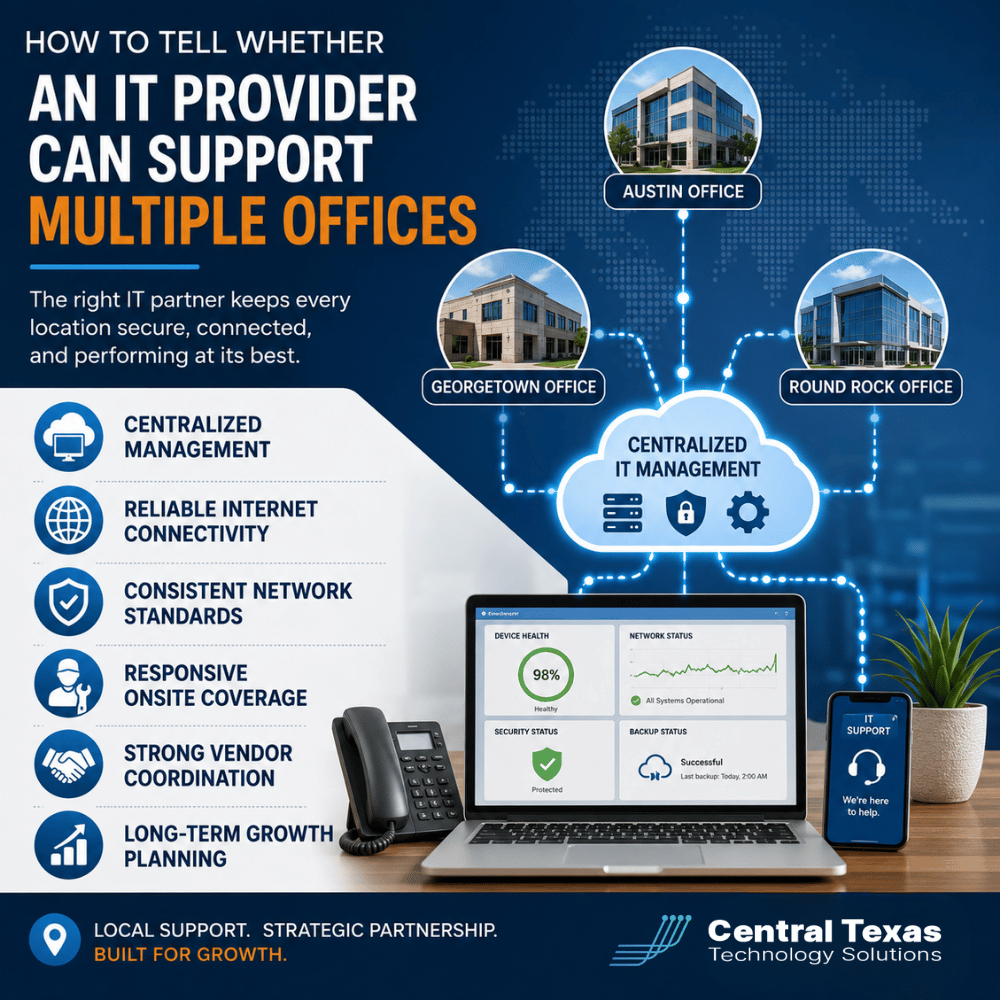
Opening a second office changes more than your address. It changes how your employees connect, how your systems communicate, how vendors are managed, and how quickly IT problems can affect more than one location.
A provider that works well for one office may struggle once your company expands.
The right IT provider should be able to manage multiple locations as one connected environment while still handling the unique needs of each office. That requires more than remote help desk support. It takes centralized management, consistent network standards, reliable connectivity, onsite coverage, vendor coordination, and a clear plan for future growth.
Here is how to tell whether an IT provider is prepared to support a multi-office business.
Can Your IT Provider Manage Multiple Offices From One Centralized System?
One of the first things to look for is centralized IT management.
Your provider should be able to monitor computers, servers, networks, security tools, backups, and other systems across every location without treating each office like a completely separate environment.
Centralized management makes it easier to:
- Apply security updates consistently
- Monitor devices across locations
- Enforce company-wide security policies
- Manage user accounts and access
- Track hardware and software
- Identify problems before employees report them
Without centralized management, standards tend to drift.
One office may receive updates while another falls behind. Security settings may differ between locations. Devices may be added without proper documentation. Over time, those inconsistencies create unnecessary support problems and security risks.
For healthcare organizations, law firms, professional services companies, construction firms, manufacturers, and nonprofits, consistent management becomes especially important when employees regularly move between offices or access the same business systems from different locations.
How Should an IT Provider Handle Internet Connectivity Between Offices?
Internet connectivity becomes a business-critical issue when multiple offices depend on cloud applications, VoIP phones, shared files, Microsoft 365, remote access, or communication between locations.
A capable multi-office IT provider should evaluate more than internet speed.
They should understand:
- Available internet providers at each location
- Bandwidth requirements
- Reliability and service history
- Backup internet options
- Firewall configuration
- Secure communication between offices
- Cloud application performance
- Remote and hybrid employee access
Imagine a professional services company with offices in Austin and Georgetown. Employees at both locations depend on cloud-based business applications throughout the day.
If one office regularly experiences internet outages, that becomes more than a technical inconvenience. Productivity stops.
An experienced IT provider may recommend a secondary internet connection or cellular failover so employees can continue working when the primary provider goes down.
The goal is not simply connecting every office to the internet. It is building enough reliability into the network to support normal business operations when something fails.
Does the Provider Use Consistent Network Standards Across Locations?
Another sign of a strong multi-location IT provider is standardization.
Your offices do not need to be identical, but they should follow the same basic technology standards whenever possible.
That may include standardized:
- Firewalls
- Wireless access points
- Network switches
- Security configurations
- Backup systems
- Computer specifications
- Monitoring software
- Cabling practices
Standardization makes troubleshooting faster because technicians know what equipment and configurations they are working with before they begin.
It also makes future expansion easier.
If your company opens another office in Round Rock, your provider should not be designing the network from scratch. They should already have a documented technology standard that can be adapted to the new location.
Manufacturing and construction companies often benefit significantly from this approach because new offices, warehouses, job sites, or facilities may need to come online quickly.
Healthcare and legal organizations may also require additional controls based on compliance, access, and data security requirements.
Consistency creates a reliable foundation while still allowing each location to accommodate its specific needs.
What Happens When Someone Needs Onsite IT Support?
Remote support can solve many problems, but not every problem.
Sometimes someone needs to physically inspect a network switch, replace failed hardware, troubleshoot cabling, install equipment, or work directly with an internet provider.
Ask a prospective IT provider how onsite support works across your locations.
Important questions include:
- Do you have technicians who can reach each office?
- Are onsite visits included in your agreement?
- How quickly can someone arrive when needed?
- Do you rely heavily on third-party contractors?
- How do you support offices outside your immediate area?
A company with locations in Austin, Cedar Park, Taylor, or other Central Texas communities should understand exactly how the provider handles physical service calls.
This becomes even more important during emergencies.
If an office loses its network connection because of failed equipment, telling employees to wait several days for someone to arrive is not an acceptable multi-office support strategy.
CTTS combines remote monitoring and support with onsite assistance when the situation requires someone physically present.
Can the IT Provider Coordinate Vendors Across Every Office?
Multiple offices usually mean multiple vendors.
You may have different internet providers, phone vendors, copier companies, software providers, security companies, cabling contractors, and equipment suppliers.
Someone needs to coordinate them.
A strong managed IT provider should help manage technology vendors rather than forcing your internal team to act as the middleman every time something goes wrong.
For example, imagine your Georgetown office loses internet connectivity. Your employees know something is wrong, but they do not know whether the problem involves the firewall, network equipment, cabling, or internet provider.
Your IT partner should investigate the issue and, when necessary, work directly with the internet provider.
Your office manager should not have to spend an afternoon bouncing between multiple support departments while trying to determine who is responsible.
Vendor coordination becomes increasingly valuable as the number of locations grows because the number of potential support relationships grows with it.
Can the IT Provider Help You Plan for Future Office Growth?
Supporting multiple offices is not only about maintaining the locations you already have.
Your provider should also help you plan for what comes next.
Before signing a lease or opening another location, IT should be involved in discussions about:
- Internet availability
- Network cabling
- Wi-Fi coverage
- Phone systems
- Security requirements
- Workstations and equipment
- Conference rooms
- Cloud connectivity
- Backup systems
- Vendor lead times
- Move-day support
Growth planning prevents rushed technology decisions.
A nonprofit adding a satellite office, a construction company expanding into another market, or a manufacturing company opening another facility may all face different technical requirements. The underlying planning process, however, should be consistent.
Your IT provider should understand your growth strategy and help build technology that can scale with it.
That is one of the biggest differences between a reactive IT company and a strategic IT partner.
A reactive provider waits for the new office to open and starts solving problems.
A proactive provider is involved before the first employee moves in.
Choose an IT Provider That Can Grow With Your Business
Supporting multiple offices requires more than answering support tickets.
Your IT provider needs the systems, people, processes, and planning capabilities to keep every location secure, connected, and productive.
Before choosing a provider, look for evidence of:
- Centralized management
- Reliable connectivity planning
- Consistent network standards
- Responsive onsite coverage
- Strong vendor coordination
- Long-term growth planning
CTTS helps businesses across Austin, Georgetown, Round Rock, Taylor, and surrounding Central Texas communities build IT environments that can grow without creating unnecessary complexity.
Whether you operate a healthcare practice, law firm, professional services company, construction business, manufacturing operation, or nonprofit, your technology should make expansion easier rather than creating another obstacle.
Schedule a free strategy call with CTTS to discuss how your current IT environment will handle your next office, location, or phase of growth.
Frequently Asked Questions
Can one managed IT provider support offices in different cities?
Yes. A capable managed IT provider can manage most systems remotely while providing onsite support when physical work is required. The key is having centralized tools, documented standards, reliable local coverage, and clear processes for managing each location.
Should every office use the same IT equipment?
Not necessarily, but standardization is usually beneficial. Using consistent firewalls, wireless equipment, computers, security tools, and network configurations can simplify support, reduce compatibility issues, and make expansion easier.
When should IT become involved in planning a new office?
Ideally, IT should be involved before the lease is finalized. Internet availability, cabling, network design, security, phone systems, and equipment lead times can affect both the location and the opening schedule. Early planning helps prevent expensive last-minute surprises.
Contact CTTS today for IT support and managed services in Austin, TX. Let us handle your IT so you can focus on growing your business. Visit CTTSonline.com or call us at (512) 388-5559 to get started!
If you're evaluating IT providers, these resources will guide you:
How Do You Measure the ROI of Managed IT Services?
How to Compare IT Support Proposals Without Getting Lost in Technical Details
What Should an IT Provider Ask Before Giving You a Proposal?
How to Know If an IT Company Is a Good Fit for Your Business Culture
What Questions Should Your Leadership Team Ask Before Switching IT Providers?
How to Choose an IT Partner Before a Cybersecurity Insurance Renewal
How to Verify an IT Company’s Cybersecurity Experience Before Hiring Them
What Should You Look for in an IT Provider’s Service Level Agreement?