
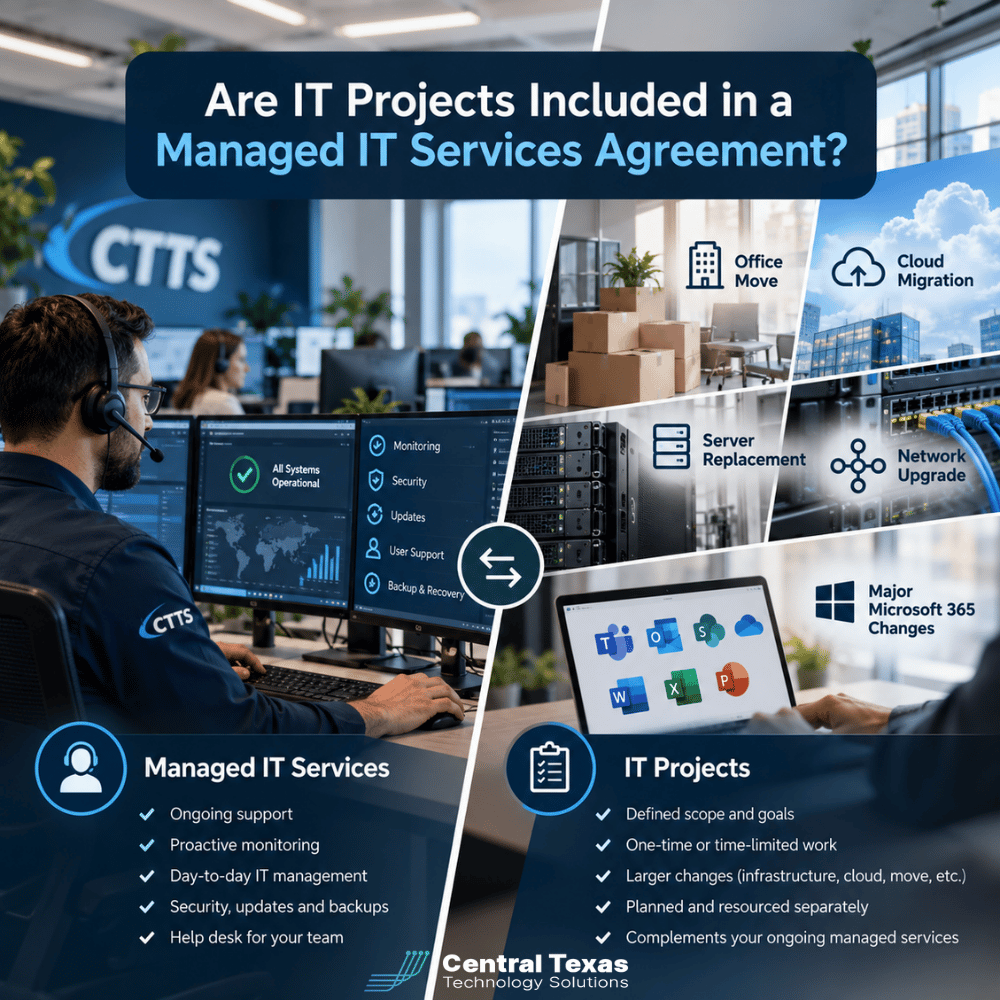
 Most managed IT services agreements cover everyday technology support, but major IT projects are often handled separately. Understanding the difference helps businesses avoid unexpected costs, plan technology improvements, and make better decisions about their IT investments.
Imagine your company is preparing to move into a larger office. You already pay a monthly fee for managed IT services, so you assume your IT provider will handle the move, install the new network, and get everyone connected without additional charges.
Then you receive a separate project estimate.
Is your IT provider charging you for something you already pay for? Not necessarily. The answer depends on how your managed IT services agreement defines recurring support versus project work.
For business owners, knowing that distinction before a major technology change can prevent budget surprises and unnecessary downtime.
What Does a Managed IT Services Agreement Normally Include?
A managed IT services agreement typically covers the ongoing support, maintenance, and protection of your company's existing technology systems.
The goal is to keep employees productive, reduce recurring problems, and identify potential issues before they interrupt business operations.
Depending on the agreement, recurring services may include:
-
IT help desk support: Helping employees resolve computer problems, access applications, and troubleshoot everyday technology issues.
-
Proactive monitoring: Identifying system performance problems, equipment failures, and other potential disruptions.
-
Managed network services: Maintaining network connectivity, monitoring infrastructure, and addressing routine network problems.
-
Cybersecurity services: Managing ongoing security protections and monitoring for threats.
-
Software maintenance: Installing updates, applying security patches, and maintaining supported applications.
-
Data backup and recovery: Managing backup systems and helping businesses recover important information when covered by the agreement.
-
Technology planning: Reviewing equipment, identifying risks, and recommending improvements aligned with business needs.
At CTTS, our Complete Care Coverage offering is designed to provide proactive technology management and ongoing support.
However, even comprehensive managed IT coverage should not automatically be interpreted as unlimited implementation work for every technology change.
That is why understanding the agreement's scope matters.
What Is Considered an IT Project Instead of Routine Support?
An IT project typically involves a significant change to your company's technology environment rather than maintaining systems already in place.
Projects generally require dedicated planning, additional resources, specialized equipment, or a defined implementation schedule.
Here are five common examples.
1. Office Moves and New Locations
Moving your business involves more than unplugging computers and reconnecting them somewhere else.
Your IT provider may need to coordinate internet installation, configure network equipment, relocate servers, establish wireless coverage, and test business applications.
These activities often require a separate project scope because they involve designing and implementing infrastructure at a new location.
2. Cloud Migrations
Moving files, applications, or servers from local equipment to cloud platforms is another common project.
A cloud migration may require evaluating existing systems, transferring data, configuring permissions, testing applications, and preparing employees for new workflows.
Routine management of an existing cloud environment may be covered by your monthly agreement. Moving your entire company to a new platform is a different undertaking.
3. Server Replacements
When an aging server reaches the end of its useful life, replacing it involves more than purchasing new hardware.
The work may include configuring the replacement, migrating applications and data, testing connectivity, and safely retiring the old equipment.
Ongoing server monitoring may be included in managed IT support, while the replacement and migration are quoted separately.
4. Network Upgrades
Routine network troubleshooting is different from redesigning your company's network.
A major upgrade might involve replacing switches, installing new wireless access points, expanding capacity, or implementing a new firewall architecture.
For a growing manufacturing company, this could mean improving connectivity throughout an expanding production facility.
5. Major Microsoft 365 Changes
Microsoft 365 is a good example of how routine support and project work can overlap.
Adding a user, resetting a password, or adjusting an employee's permissions may fall under regular support.
However, migrating hundreds of mailboxes, restructuring SharePoint, consolidating Microsoft 365 tenants, or implementing company-wide access policies can become a substantial project.
The difference is not simply the technology involved. It is the amount of planning, coordination, risk, and implementation work required.
Managed IT Support vs. IT Project Work: What's the Difference?
The following comparison shows how similar technology requests can fall into different categories.
| Technology Area | Routine Managed IT Support | Potential IT Project |
|---|---|---|
| Employee computers | Troubleshooting problems and installing updates | Replacing computers across an entire company |
| Microsoft 365 | Adding accounts and managing routine access | Tenant migration or major SharePoint restructuring |
| Servers | Monitoring performance and applying updates | Replacing servers and migrating applications |
| Networks | Resolving connectivity problems | Replacing network infrastructure |
| Cloud systems | Maintaining existing cloud applications | Migrating business systems to the cloud |
| Office locations | Supporting existing equipment and users | Building IT infrastructure for a new office |
These are common distinctions, not universal rules. Some managed service providers include certain project activities in their monthly agreements, while others charge separately.
The important question is not whether a task sounds like support or a project. It is whether your specific agreement includes it.
A useful comparison is the difference between maintaining a building and renovating it. Regular maintenance keeps the building functional. A renovation changes its structure or capabilities.
Technology works much the same way.
Why Are Major IT Projects Often Billed Separately?
It might seem reasonable to expect everything IT-related to fall under one monthly payment.
However, separating recurring support from major project work can benefit the customer when the process is transparent.
More Predictable Monthly Costs
A managed IT agreement is generally designed around ongoing service needs.
Including every possible office relocation, server replacement, and major migration in the monthly price could make costs significantly higher for businesses that rarely need those projects.
Separating projects allows businesses to pay for major improvements when they actually need them.
Better Project Planning
Major technology changes need clear goals, schedules, responsibilities, and budgets.
A separate statement of work can establish exactly what will be delivered, what equipment is required, when implementation will occur, and how success will be measured.
This reduces misunderstandings and gives leadership greater control over the investment.
Less Disruption to Daily Operations
A poorly planned technology project can interrupt business for hours or even days.
Consider a healthcare practice replacing its server or a law firm moving sensitive client documents into a new cloud environment.
Both projects require careful scheduling, testing, and security considerations.
Treating these activities as planned projects rather than ordinary support tickets makes it easier to manage risks and minimize interruptions.
The distinction should also work in the customer's favor. A provider should not label every small change a project simply to generate additional fees.
How Should Your Managed IT Provider Help You Budget for Projects?
A separate project fee should not mean your business has to figure out future technology costs on its own.
This is where a proactive IT partner becomes particularly valuable.
Your provider should understand your business plans well enough to identify major technology investments before they become urgent.
For example, a professional services firm preparing to hire 25 additional employees may need more licenses, computers, network capacity, and security protections.
A construction company opening another location may require networking, secure remote access, and reliable connectivity between offices.
Nonprofits may need to plan carefully around limited budgets, while healthcare, legal, and manufacturing organizations may face additional operational or compliance requirements.
Rather than waiting until equipment fails or a deadline approaches, your IT partner should help you:
-
Identify upcoming projects. Review aging equipment, business expansion plans, software requirements, and security gaps.
-
Prioritize investments. Determine which improvements address immediate risks and which can be scheduled later.
-
Estimate costs. Account for equipment, licensing, implementation, and potential downtime.
-
Build a technology roadmap. Spread major projects across budget periods when practical.
-
Coordinate implementation. Plan changes around business operations and confirm the results meet expectations.
For businesses in Austin, Georgetown, Cedar Park, and Pflugerville, this type of planning is particularly important when preparing for growth, facility changes, or technology modernization.
A good IT provider should help you see major expenses coming instead of presenting them as surprises.
What Should You Ask Before Signing a Managed IT Services Agreement?
Before choosing an IT provider, make sure you understand exactly what your monthly fee covers.
Ask these questions:
-
Which recurring services are included in the monthly agreement?
-
What types of work are considered separate IT projects?
-
Are smaller changes, such as adding employees or replacing individual computers, included?
-
Does the agreement cover project planning and consultation, even when implementation costs extra?
-
How are projects priced, and is written approval required before work begins?
-
Are hardware, software licensing, and third-party expenses billed separately?
-
Will the provider help develop an annual technology budget and project roadmap?
Be especially careful with phrases such as "unlimited IT support."
Unlimited support for covered systems does not necessarily mean unlimited office moves, migrations, equipment installations, or infrastructure upgrades.
The agreement should clearly explain where routine service ends and separately billed work begins.
Frequently Asked Questions About Managed IT Agreements
Does unlimited managed IT support include IT projects?
Not necessarily. Unlimited support generally applies to defined recurring services, such as troubleshooting, maintenance, and employee assistance. Large projects may fall outside that scope. Review the agreement's exclusions and ask your provider to explain how project work is classified.
Should my IT provider charge separately for replacing a server?
Often, yes. While monitoring and maintaining an existing server may be included in managed IT services, replacing it may involve new hardware, data migration, configuration, and testing. Those activities are commonly priced as a separate project. The exact charges depend on your agreement.
Can IT project costs be included in a monthly managed services agreement?
Yes. Some providers offer agreements that include specific project labor, scheduled technology refreshes, or a defined number of project hours. Others use separate project estimates. Either arrangement can work well when responsibilities, limitations, and pricing are clearly documented.
Get Clear Answers About Your Managed IT Coverage
Your managed IT services agreement should give you confidence about both everyday support and major technology investments.
At CTTS, we believe businesses deserve clear expectations, proactive planning, and technology guidance that supports their long-term goals.
Whether you are preparing for an office move, replacing aging infrastructure, or evaluating your current managed IT agreement, our team can help you understand your options.
Schedule a consultation with CTTS to discuss your technology needs and develop a practical plan for ongoing support and future IT projects.
Call (512) 388-5559 or visit CTTSonline.com to get started.
Contact CTTS today for IT support and managed services in Austin, TX. Let us handle your IT so you can focus on growing your business. Visit CTTSonline.com or call us at (512) 388-5559 to get started!
Make your next IT decision with confidence. Start with these insights:
How Much Should Cybersecurity Add to Your Monthly IT Budget?
Why Cheap IT Support Feels Affordable Until Something Breaks
Why Some IT Providers Charge Setup Fees and Others Do Not
How Much Does It Cost to Switch IT Providers?
What Is the Real Cost of Supporting an Employee Who Works Remotely?
Should IT Hardware Be Included in Your Monthly Managed Services Agreement?
Why Your IT Bill Changes When Your Company Adds Employees or Locations
Why Do Managed IT Providers Charge Per User, Per Device, or Both?
What Does Cybersecurity Add to the Cost of Managed IT Services?