
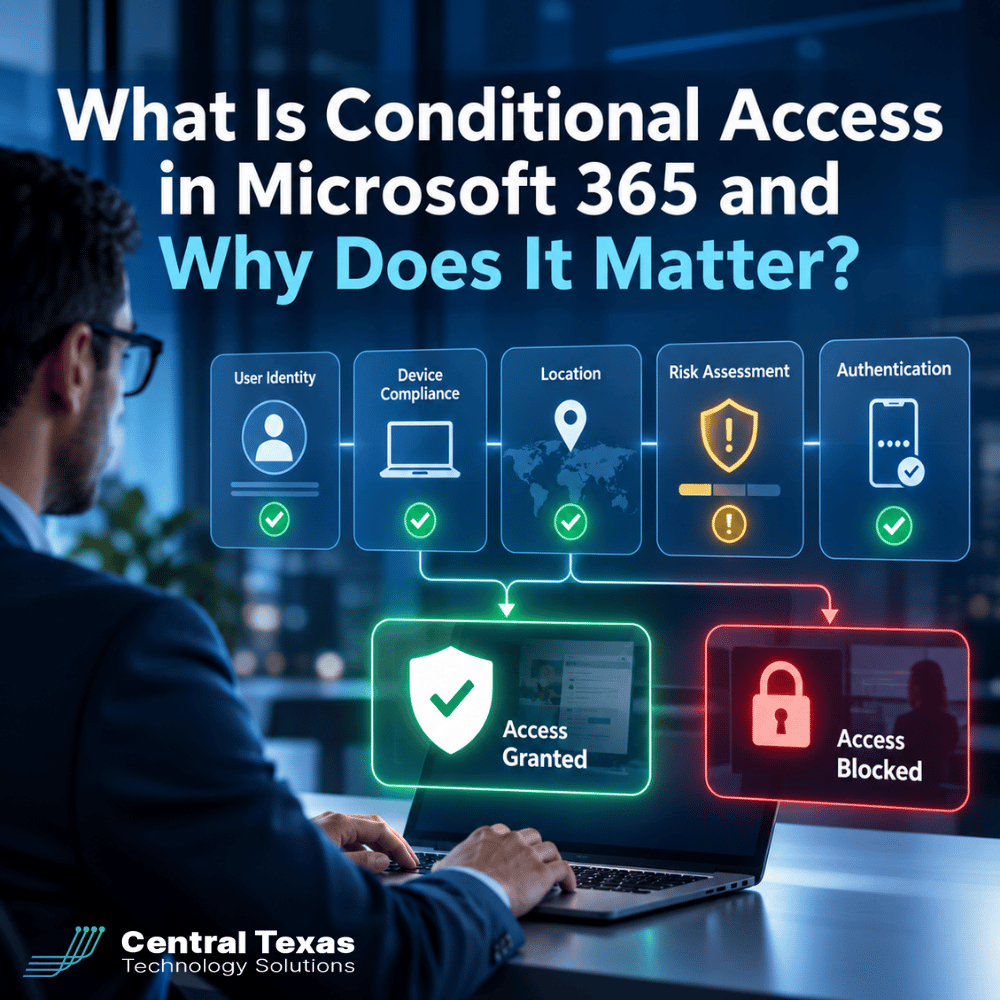
A correct password should not automatically mean someone gets access to your company's Microsoft 365 environment.
Think about a normal employee who signs in every morning from a company laptop in Austin. Now imagine the same account suddenly attempts to access company files from an unfamiliar device in another country.
Even if the username and password are correct, should Microsoft 365 treat those two sign-ins the same way?
Conditional Access gives businesses a way to say no.
Microsoft Entra Conditional Access evaluates information about a sign-in and applies security rules based on the circumstances. Microsoft describes Conditional Access as a core part of its Zero Trust security model because access decisions can consider signals such as the user, device, network or location, and risk rather than simply trusting someone because they entered the right credentials.
For businesses in Austin, Round Rock, Georgetown, Cedar Park, and throughout Central Texas, that can add an important layer of protection to Microsoft 365.
What Is Conditional Access in Microsoft 365?
Conditional Access is essentially a security decision engine.
A policy can be thought of as an "if this happens, then require this" rule.
For example:
- If an employee signs in, require multifactor authentication.
- If someone accesses sensitive information, require a compliant company device.
- If a sign-in originates from a location where the company does not operate, block it.
- If Microsoft identifies an elevated sign-in risk, require additional verification or deny access.
- If an administrator accesses sensitive systems, require a stronger authentication method.
Microsoft Entra can combine multiple signals when making these decisions. Depending on the policy, Microsoft 365 can grant access, require additional authentication, require a compliant device, apply other restrictions, or block access entirely.
This allows security to adapt to the situation instead of applying the same rule to every login.
Why Passwords and MFA Alone May Not Be Enough
Multifactor authentication is an important part of Microsoft 365 security, but MFA and Conditional Access are not the same thing.
MFA asks the user to provide additional proof of identity.
Conditional Access determines when additional proof or another security requirement should be required, and under what circumstances access should be allowed at all.
That distinction matters.
Suppose an employee's credentials are compromised through phishing. The attacker tries to access Microsoft 365 from a personal computer in an unexpected location.
A properly designed Conditional Access policy could recognize that the device does not meet the company's compliance requirements and prevent it from accessing sensitive resources, even when the attacker has valid credentials. Microsoft specifically recommends device compliance requirements as a way to reduce the risk of someone using stolen credentials from an unauthorized device.
Conditional Access moves the security question from:
"Did this person enter the correct password?"
to:
"Do we trust this access request?"
That is a much stronger foundation for protecting modern businesses.
How Microsoft 365 Conditional Access Evaluates a Sign-In
One of the strengths of Conditional Access is that policies can consider several pieces of context at the same time.
User
Not every account carries the same level of risk.
An administrative account may have access to security settings, user accounts, email, and other critical systems. A finance employee might have access to financial records that most employees never need.
Conditional Access policies can apply different requirements based on users, groups, roles, and the resources they are trying to access.
Device
Where is the employee working?
More importantly, what are they working from?
A company-managed laptop that meets your security requirements should not necessarily be treated the same as an unknown personal computer.
Conditional Access can require a device to be marked compliant before granting access. That can be especially valuable for businesses with remote or hybrid employees who regularly access Microsoft 365 outside the office.
Location and Network
Conditional Access can also use network or location information.
For example, an organization could require additional authentication when users are away from trusted networks or block access from countries or regions where the organization does not conduct business. Microsoft notes that network conditions can be used for scenarios such as requiring MFA outside the corporate network or blocking access from particular countries.
Location alone should not determine whether a user is trustworthy, but it can be a useful signal when combined with other information.
Risk
With the appropriate Microsoft Entra licensing, organizations can incorporate user risk and sign-in risk into Conditional Access decisions.
Sign-in risk estimates the likelihood that an authentication request is not actually coming from the legitimate account owner. User risk evaluates the likelihood that an identity itself has been compromised.
A normal sign-in might proceed normally, while a suspicious attempt could trigger stronger authentication or be blocked.
Risk-based Conditional Access requires Microsoft Entra ID P2 capabilities.
Authentication
Conditional Access can also control how users prove their identities.
Policies can require MFA or specify an authentication strength. Microsoft provides authentication-strength options that can be used to require stronger methods for particularly sensitive situations.
This means a business can apply stronger authentication requirements to higher-risk users and resources instead of assuming every authentication method provides the same protection.
What Does Conditional Access Look Like in a Real Business?
Consider a Central Texas professional services firm with employees working from its Georgetown office, client locations around Austin, and home offices throughout the region.
One employee signs into Microsoft 365 from a managed company laptop in Round Rock. The device meets the company's security requirements and the sign-in does not appear suspicious.
Access proceeds according to company policy.
Later, someone attempts to use that employee's account from an unmanaged computer in a location that does not match the company's normal operations.
The password might be correct, but other signals raise concerns. Conditional Access could require stronger authentication, require a compliant device, or block the attempt based on the policies the company has established.
That same concept applies across many industries.
Healthcare organizations may need stronger controls around systems containing sensitive patient information. Legal and professional services firms need to protect confidential client files. Construction companies may have employees accessing Microsoft 365 from offices, jobsites, and mobile devices. Manufacturers need to protect business systems without interfering with operations. Nonprofits need to safeguard donor, employee, and financial information.
The exact policy should vary, but the principle remains the same: access should reflect business risk.
Why Conditional Access Policies Need to Be Planned Carefully
Conditional Access is powerful, which also means a poorly designed policy can create problems.
An overly aggressive rule could prevent legitimate employees from working. A poorly scoped rule could leave users or applications outside the protection you intended to provide.
Microsoft recommends testing Conditional Access policies before broad deployment and provides report-only capabilities that allow administrators to evaluate the potential impact before enforcement. Microsoft also recommends maintaining emergency access accounts so administrators are not accidentally locked out because of a policy configuration problem.
This is why Conditional Access should not simply be switched on and forgotten.
A good implementation starts by understanding:
- Who needs access to what
- Which accounts have elevated privileges
- Which devices should be trusted
- How remote employees work
- Which applications contain sensitive information
- Where legitimate users normally connect from
- What should happen when a sign-in appears risky
- Which authentication methods are appropriate for sensitive access
The goal is not to make Microsoft 365 difficult to use. It is to make legitimate access convenient while making unauthorized access significantly harder.
Does Your Microsoft 365 Environment Have the Right Conditional Access Policies?
Having Microsoft 365 does not automatically mean your organization has a well-designed Conditional Access strategy.
Licensing also matters. Microsoft Entra ID P1 provides Conditional Access capabilities and is included with plans such as Microsoft 365 Business Premium and Microsoft 365 E3. Risk-based Conditional Access requires Microsoft Entra ID P2, which is included with Microsoft 365 E5.
The bigger question is whether the capabilities available to your organization have been configured around the way your business actually operates.
At CTTS, we believe Microsoft 365 security should be proactive. Instead of waiting for a compromised account to become a breach, businesses should establish clear rules for who can access company resources, from which devices, under what circumstances, and with what level of authentication.
Conditional Access is one of the tools that makes that possible.
For businesses in Austin, Round Rock, Georgetown, Cedar Park, and across Central Texas, CTTS can review your Microsoft 365 environment, identify access-control gaps, and help align your security configuration with the way your employees actually work.
Move Beyond Password-Only Security
A password can tell Microsoft 365 that someone knows a credential. It cannot, by itself, tell you whether you should trust the person, device, location, or circumstances behind the request.
Conditional Access helps close that gap.
Schedule a Microsoft 365 security assessment with CTTS to find out whether your current access policies are protecting your users and business data the way they should.
Frequently Asked Questions About Microsoft 365 Conditional Access
Is Conditional Access the same as multifactor authentication?
No. MFA is an authentication method that requires additional proof of identity. Conditional Access is the policy engine that can determine when MFA or other security controls are required. It can also require compliant devices, specify authentication strength, or block access entirely based on the circumstances of a sign-in.
Can Conditional Access block Microsoft 365 access from certain locations?
Yes. Conditional Access can use network and location information as part of an access policy. For example, an organization may block access from countries where it does not operate or apply additional requirements when employees connect outside trusted networks.
Does every Microsoft 365 plan include Conditional Access?
No. Conditional Access generally requires Microsoft Entra ID P1 or higher. Microsoft 365 Business Premium and Microsoft 365 E3 include Entra ID P1, while Microsoft 365 E5 includes Entra ID P2. Organizations without those capabilities can use Microsoft's security defaults for baseline protections, but security defaults do not provide the same granular control.
Contact CTTS today for IT support and managed services in Austin, TX. Let us handle your IT so you can focus on growing your business. Visit CTTSonline.com or call us at (512) 388-5559 to get started!
Explore these expert insights before making your next IT decision:
How Conditional Access Helps Protect Your Business From Unauthorized Logins
What Is Zero Trust Security and Does Your Business Really Need It?
How Business Email Compromise Happens and How to Prevent It
Why Endpoint Security Matters When Your Team Works From Anywhere
What Is Microsoft Intune and Does Your Business Need It?
What Is SASE and Why Are More Texas Businesses Using It?
What Is DMARC and How Does It Protect Your Business Email Domain?
What Is Vulnerability Management and How Is It Different From a Security Scan?
What Is SIEM and Does a Small or Mid-Sized Business Really Need It?
How Microsoft Intune Improves Device Security, Onboarding, and Hybrid Work