
Remote work has changed the way businesses think about network security.
For years, a virtual private network, or VPN, was the standard way to give employees secure access to company systems from home, hotels, customer locations, and other remote environments. VPNs are still widely used and can work well, but they were designed around a different security model.
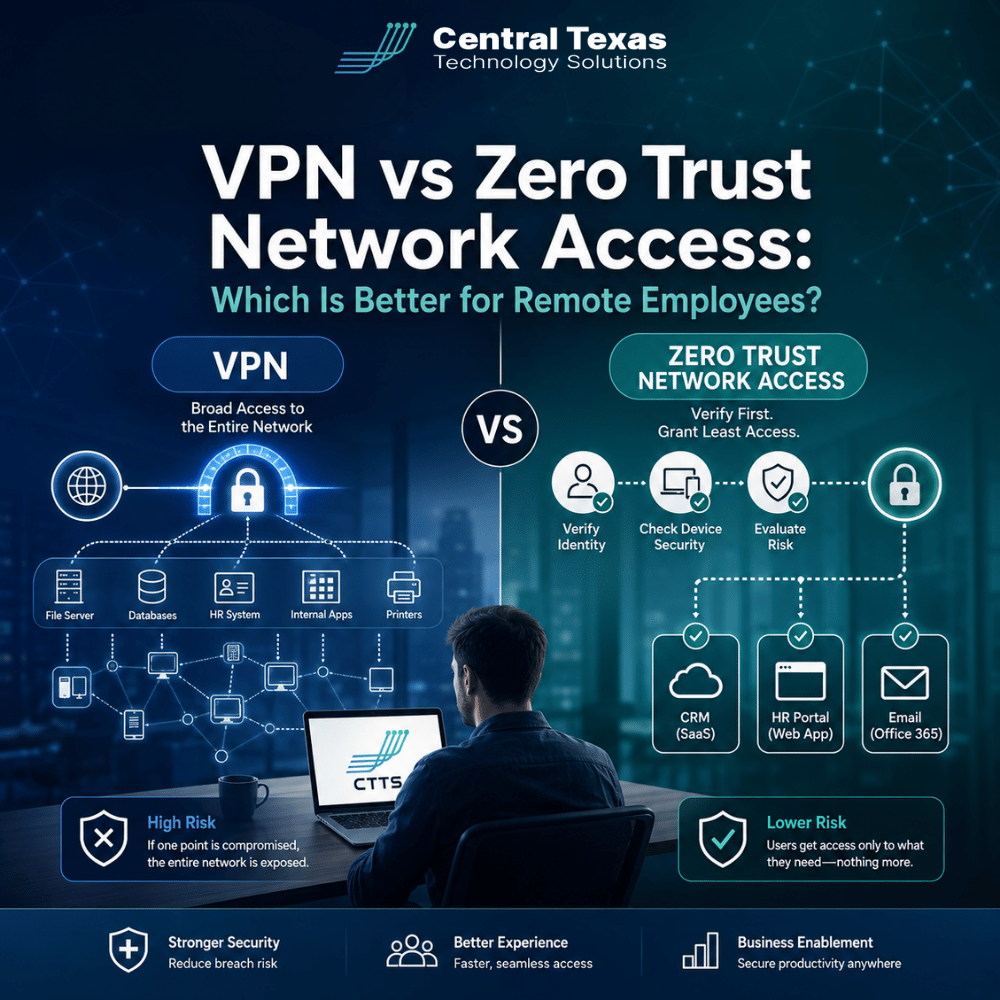
Zero Trust Network Access, often called ZTNA, takes a more selective approach. Instead of connecting someone to an entire internal network, it verifies who they are, checks the device they are using, and gives them access only to the applications they are authorized to use.
For businesses across Austin, Round Rock, Georgetown, Pflugerville, and Central Texas, understanding the difference can help you build a safer and more manageable remote workforce.
How Does a VPN Handle Remote Employee Access?
A VPN creates an encrypted connection between an employee's device and the company network.
Once connected, the employee can often access internal resources much like they would if they were sitting inside the office.
That model can be convenient, especially for businesses that still operate applications or servers that depend on traditional network access.
A typical VPN process looks something like this:
- The employee connects to the internet.
- They launch the VPN software.
- They enter their credentials, usually with multifactor authentication.
- The VPN creates an encrypted connection to the company's network.
- The employee accesses authorized network resources.
The encryption is valuable because it helps protect information traveling between the remote employee and the business.
The potential problem is what happens after the connection is established.
Traditional VPN environments can give users broader access to the internal network than they actually need. If an employee's credentials or laptop are compromised, an attacker may be able to move from one system to another after gaining VPN access.
That does not mean VPNs are inherently insecure. It means businesses have to carefully manage authentication, segmentation, endpoint security, permissions, and monitoring around them.
How Does Zero Trust Network Access Work?
Zero Trust Network Access approaches remote access from a different direction.
Instead of asking, "Is this person connected to our network?" ZTNA asks questions such as:
- Who is requesting access?
- Is this person authorized?
- Is this device trusted and secure?
- What application are they trying to reach?
- Does their role require access to that application?
- Does anything about this login appear unusual?
Access is then granted to a specific resource rather than the entire internal network.
For example, an accounting employee might need access to a financial application but have no reason to connect directly to engineering systems, production servers, or other internal resources.
ZTNA can enforce those boundaries.
This concept is often summarized as "never trust, always verify," but the business value is more practical than the phrase suggests. Zero Trust limits unnecessary access and reduces the opportunities an attacker has if an account or endpoint is compromised.
VPN vs Zero Trust Network Access for Identity and Devices
One of the biggest differences between VPN and Zero Trust Network Access is how much emphasis each approach places on identity and device health.
A VPN commonly authenticates the user when the connection begins. Modern VPN deployments may also use multifactor authentication, certificates, endpoint security checks, and other safeguards.
ZTNA generally makes identity a central part of every access decision.
Policies can consider factors such as:
- Employee identity
- Job role
- Location
- Device ownership
- Operating system
- Security software status
- Multifactor authentication
- Application being requested
- Risk level of the login
Device security can be especially important.
Imagine an employee tries to access sensitive company information from an unmanaged personal laptop that has not received security updates in months.
A traditional VPN configuration might allow the connection if the user enters the correct credentials.
A properly configured Zero Trust system could recognize that the device does not meet company security requirements and block access.
That additional context can significantly reduce risk for organizations managing remote and hybrid employees.
VPN vs ZTNA for Application Access and Security
Traditional VPNs tend to be network-focused.
ZTNA tends to be application-focused.
That distinction matters because most employees do not need access to an entire corporate network. They need access to a handful of applications that help them do their jobs.
A legal professional might need access to document management and case management systems.
A healthcare employee may need specific clinical or administrative applications while the organization works to protect sensitive patient information.
A construction company might have project managers accessing estimating tools, cloud files, and project management platforms from jobsites.
Manufacturing employees may need secure access to operational or business applications without exposing production systems.
Professional services firms often have employees moving between client locations, home offices, and company offices.
Nonprofits may have employees, volunteers, contractors, and board members who each require very different levels of access.
ZTNA makes it easier to build policies around these differences.
Instead of opening a pathway into the network and then controlling what the user can reach, Zero Trust can expose only the applications that person is approved to use.
If an attacker compromises one account, the available attack surface may be much smaller.
Is Zero Trust Better Than a VPN for Remote Employees?
For many modern businesses, Zero Trust Network Access provides stronger long-term security and flexibility than relying on a traditional VPN alone.
However, that does not mean every business should immediately remove its VPN.
Some legacy applications, servers, industrial systems, or specialized environments may still depend on network-level connectivity.
In those situations, a hybrid approach may make sense.
A company might use ZTNA for most employee applications while maintaining tightly controlled VPN access for systems that still require it.
The larger goal should be reducing unnecessary trust.
Remote employees should not receive access simply because they have successfully connected to the network. Access should be based on who they are, what device they are using, and what they actually need to do their jobs.
That is where the Zero Trust model becomes especially valuable.
How CTTS Helps Businesses Secure Remote Access
Moving from traditional remote access to a Zero Trust strategy is not just a software decision.
The first step is understanding how employees actually use technology.
CTTS helps Central Texas businesses review their users, devices, applications, permissions, cybersecurity controls, and remote access requirements before recommending changes.
That process may include evaluating:
- Existing VPN configurations
- Multifactor authentication
- Identity and access policies
- Endpoint security
- Device management
- Application permissions
- Network segmentation
- Remote access risks
- Employee onboarding and offboarding
- Cloud and Microsoft 365 access
The right approach depends on the business.
A healthcare organization facing compliance requirements may have different priorities than a construction company supporting employees across multiple jobsites. A law firm may need tight control over confidential client information, while a manufacturer may need to carefully separate business systems from operational technology.
CTTS focuses on building technology around the way your organization operates instead of forcing every business into the same security model.
The goal is not simply to replace one remote access tool with another. It is to create an environment where employees can work efficiently without giving users, devices, or attackers more access than necessary.
Build a Safer Remote Workforce
Remote access should make it easier for employees to work without creating unnecessary pathways into your business systems.
VPN technology may still have a role, but many organizations are moving toward Zero Trust Network Access because it provides more precise control over users, devices, and applications.
If your business is supporting remote or hybrid employees and you are not sure whether your current VPN strategy provides enough protection, CTTS can help you evaluate your environment and determine the right approach.
Schedule a free strategy call with CTTS to review your remote access and cybersecurity strategy.
Frequently Asked Questions About VPN vs Zero Trust Network Access
Can Zero Trust Network Access completely replace a VPN?
Sometimes. Businesses that primarily use cloud applications and modern business systems may be able to replace most traditional VPN access with ZTNA. Organizations that still rely on legacy applications or systems requiring network-level connectivity may continue using a VPN for certain users or applications.
Is Zero Trust Network Access more secure than a VPN?
ZTNA can provide stronger access controls because permissions are based on identity, device security, application requirements, and other factors rather than simply providing a connection to the internal network. The actual security level still depends on how well the system is configured and managed.
Do small and midsized businesses need Zero Trust?
Zero Trust is not only for large enterprises. Small and midsized businesses also face credential theft, ransomware, compromised devices, and remote access risks. A properly designed Zero Trust strategy can help reduce those risks without making it difficult for employees to work.
Contact CTTS today for IT support and managed services in Austin, TX. Let us handle your IT so you can focus on growing your business. Visit CTTSonline.com or call us at (512) 388-5559 to get started!
Make your next IT decision with confidence. Start with these insights:
Should You Standardize Your Technology Stack or Stay Flexible?
One IT Vendor vs Multiple Vendors: Which Approach Reduces Risk?
Is It Better to Upgrade Your Current Systems or Start Fresh?
Cloud Backup vs Local Backup: Which Does Your Business Need?
Managed IT Services vs Hiring One IT Person: Which Is Safer for a Growing Business?
Cybersecurity Software vs Cybersecurity Strategy: What Is the Difference?
Hourly IT Support vs Monthly Managed IT Services: Which Gives You Better Control?
Microsoft 365 Basic Setup vs Managed Microsoft 365 Support: What Are You Missing?
Cybersecurity Insurance vs Cybersecurity Protection: Why Your Business May Need Both